What this guide helps you build
HubSpot direct mail automation works best when the send is tied to a record change your team already trusts:
- a demo finishes
- a lead enters a high-intent list
- a lifecycle stage changes
- a deal closes won
- a renewal window opens
- a sales rep has enough context to write a personal follow-up
With the native Scribeless HubSpot integration, HubSpot teams can send contacts into Scribeless campaigns from two places:
- HubSpot workflows, when the rule should fire automatically.
- HubSpot contact records, when a person should choose the campaign and add context before sending.
This guide is about the operating model: which campaigns to run, which fields to map, when to automate, when to keep a human in the loop, and how to keep handwritten mail selective enough to feel personal.
Using Salesforce instead? Use the Salesforce direct mail automation guide.
Quick-start HubSpot recipes
| Use case | HubSpot trigger | Scribeless campaign | Custom variable to include | Follow-up |
|---|---|---|---|---|
| Demo follow-up | Meeting outcome is completed and lifecycle stage is SQL or Opportunity | Post-demo thank-you note | meeting_summary_intro | Owner task after delivery |
| High-intent list | Contact joins a Tier 1 pricing, webinar, or product-intent list | ABM follow-up note | intent_signal | SDR or AE task |
| Closed-won welcome | Deal closes won and onboarding owner is assigned | Welcome note | first_success_milestone | Onboarding task |
| Renewal support | Renewal date enters 90-day window | CSM renewal note | renewal_context | Renewal planning task |
Choose between workflows and contact-record sends
Use the path that matches the decision.
| Path | Use when | Who owns it | Watch for |
|---|---|---|---|
| Workflow automation | The trigger is clear enough to automate | Marketing ops, RevOps, lifecycle, CS ops | Enrollment rules, re-enrollment, frequency caps |
| Contact-record send | A person has context that should shape the note | AE, SDR, CSM, founder, account owner | Message quality, campaign choice, address completeness |
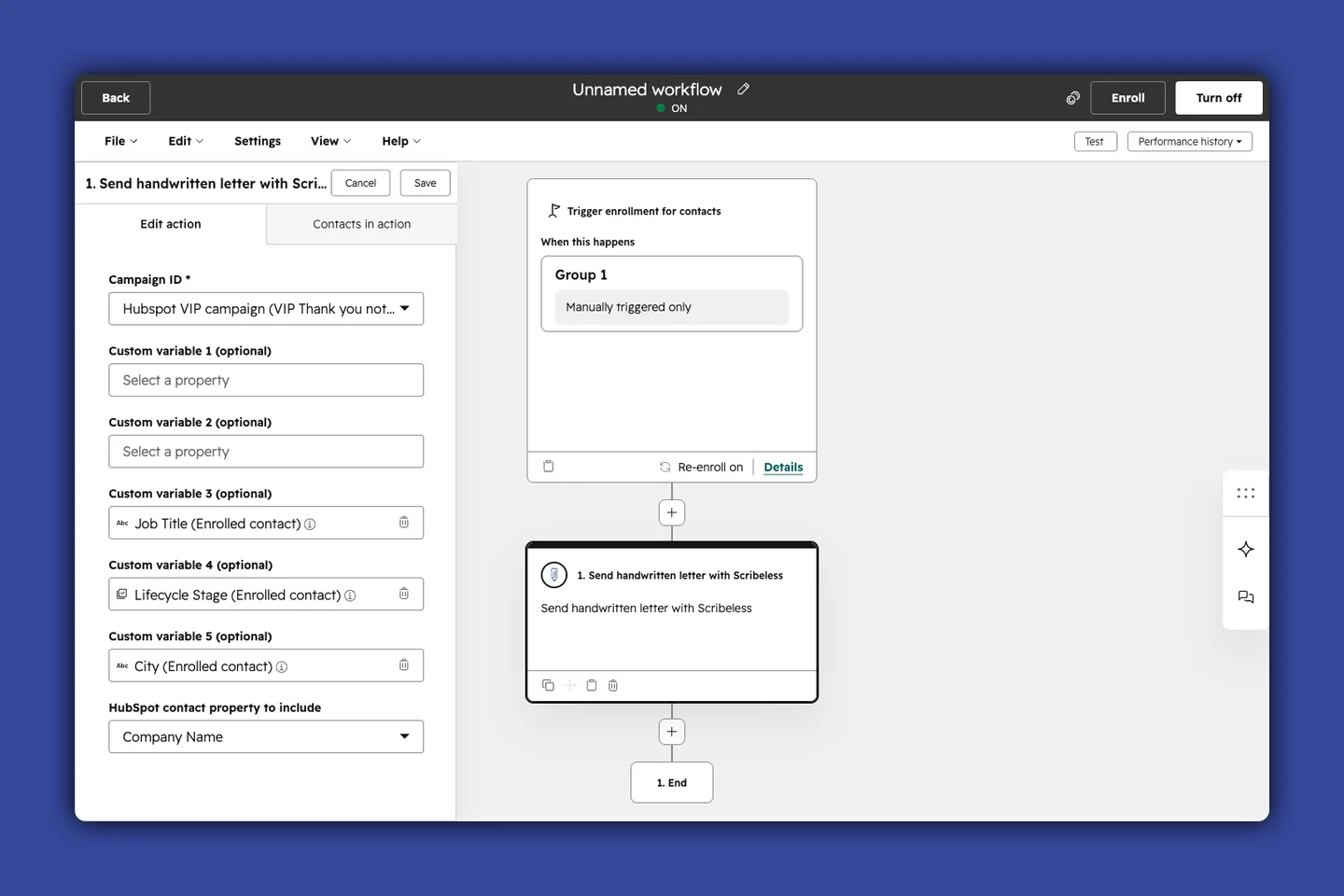
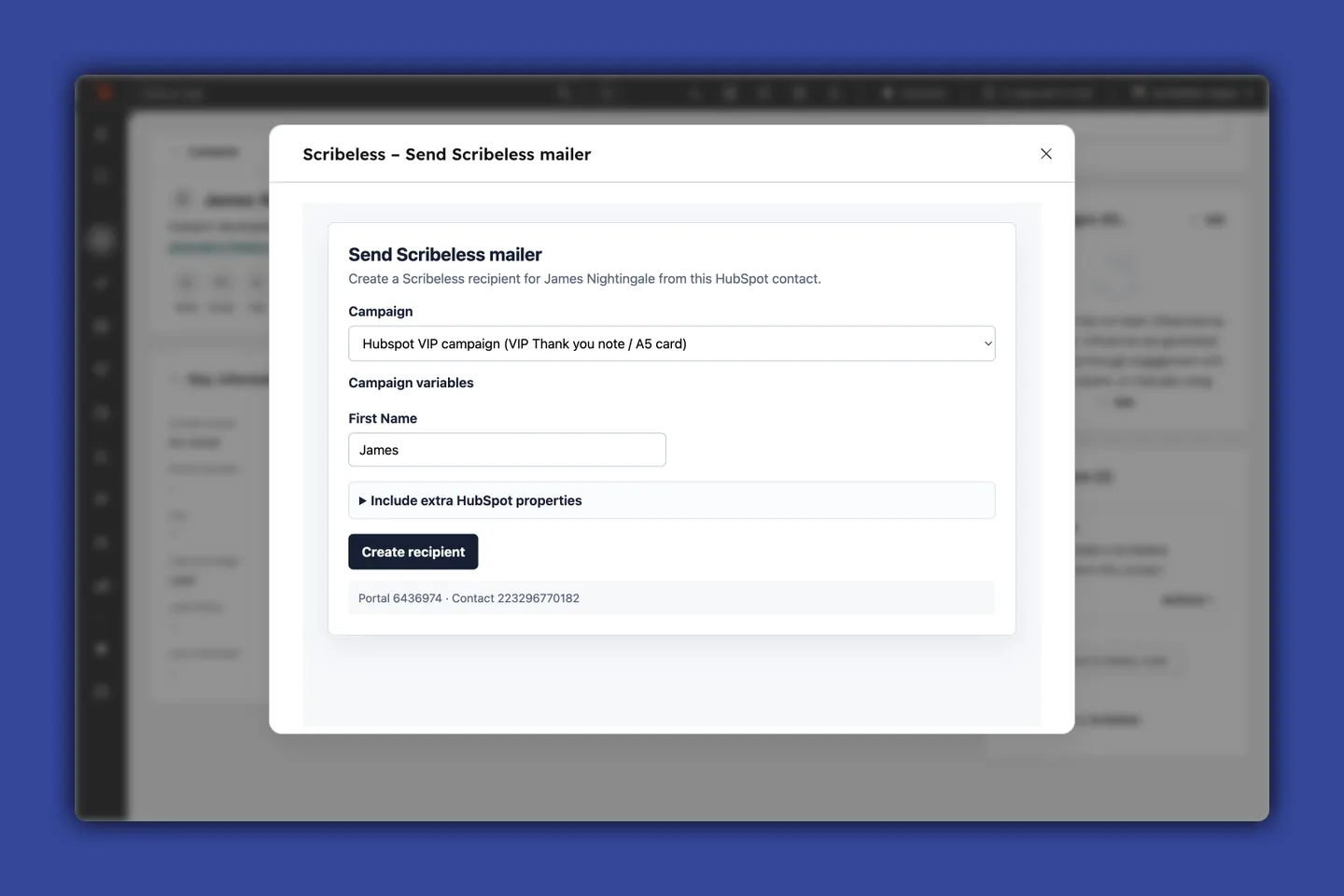
The workflow connector adds enrolled HubSpot contacts to a Scribeless campaign from a contact workflow. The contact-record send lets a rep or CSM open a contact, choose the Scribeless campaign, fill the campaign variables, optionally include extra HubSpot properties, and create the recipient without leaving the record.
The best HubSpot programs usually use both: workflows for predictable timing, manual sends for high-context relationship moments.
Workflow automation
Use workflows for repeatable moments where the trigger, audience, and follow-up can be governed in HubSpot.
Good workflow candidates:
- a qualified demo is completed
- a contact joins a high-intent list
- a lifecycle stage changes after a meaningful conversion
- a deal closes won
- a renewal window opens
- a post-event segment needs owner follow-up
A completed demo is the cleanest first workflow because the business moment is obvious. The prospect gave time, the rep has meeting context, and the next step usually matters.
Demo workflow recipe
- Create a contact-based workflow.
- Set the enrollment trigger:
- meeting outcome is completed
- meeting type is demo, discovery, consultation, or sales call
- lifecycle stage is SQL or Opportunity
- Add eligibility filters:
- postal address is complete
- do-not-mail is not true
- account tier is Tier 1 or Tier 2
- last direct mail sent date is empty or older than 30 days
- Add the Scribeless workflow action.
- Choose the campaign from the Scribeless campaign dropdown.
- Map only the custom variables that the selected Scribeless template uses:
- Custom variable 1:
meeting_summary_intro - Custom variable 2:
owner_first_name, if the template signs off from the contact owner - Custom variable 3:
next_step, if the note or QR CTA prints a record-specific next step
- Custom variable 1:
- Include extra HubSpot contact properties only when they are useful for recipient context or downstream logging. For example,
account_tier,lifecycle_stage,job_title, ormail_campaign_idmay be useful to pass through, but they do not need to be template variables unless the card or QR code actually renders them. - Update HubSpot after the action:
- set last direct mail sent date
- set last direct mail campaign ID
- create a follow-up task for the owner after the expected delivery window
The custom variable that deserves the most thought is usually the intro line. It can come from a meeting summary field, but it should be human-reviewed before the workflow depends on it. A good line sounds like:
I appreciated your point about routing physical follow-up from webinar intent signals.
That is enough. The note does not need to repeat the entire meeting.
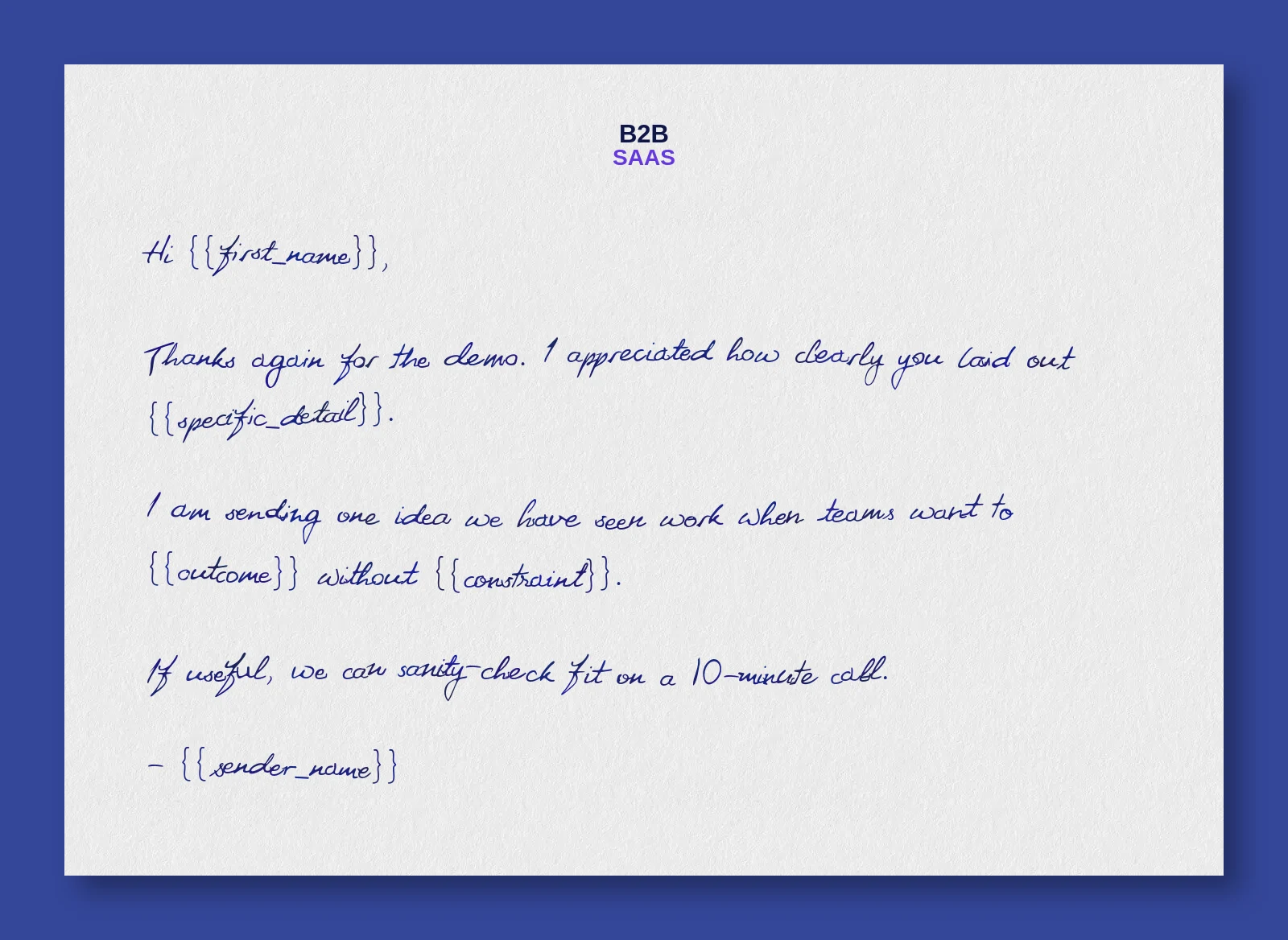
Hi ,
Thanks again for the demo. I appreciated how clearly you laid out .
I am sending one idea we have seen work when teams want to without . If useful, we can sanity-check fit on a 10-minute call.
For outbound and post-demo sequencing ideas around where this touch belongs, use the B2B sales outreach direct mail guide.
Contact-record sends
Use contact-record sends when the sender knows something the workflow cannot infer.
Use a contact-record send when:
- an AE wants to follow up after a nuanced discovery call
- a CSM wants to acknowledge a specific renewal conversation
- a founder wants to write to a strategic buyer
- an SDR wants to send to one high-fit contact after a live event
- a customer-facing teammate wants to add a one-off message before the card is created
The workflow is simple: open the HubSpot contact, use the Scribeless card, choose Send Scribeless mailer, select the campaign, fill the campaign variables, tick useful HubSpot properties, then create the recipient.
Five HubSpot campaigns worth building
Start with campaigns that match existing HubSpot ownership. Marketing should not own every send. Sales, RevOps, and CS each need different triggers and guardrails.
| Campaign | Primary team | Best mode | Trigger | Personalization field |
|---|---|---|---|---|
| Demo follow-up | Sales, RevOps | Workflow, with optional owner review | Meeting completed and contact is qualified | Meeting-specific intro |
| Lifecycle-stage note | Marketing ops, sales ops | Workflow | MQL to SQL, SQL to Opportunity, or strategic list enrollment | Why now / source campaign |
| High-intent form or list | Demand gen, ABM | Workflow | Contact joins a high-intent list after webinar, pricing, product, or event engagement | Topic or intent signal |
| Closed-won welcome | CS, onboarding | Workflow or manual | Deal closes won and onboarding owner is assigned | Welcome message from CSM or founder |
| Renewal note | CS ops, CSM | Workflow plus manual override | Renewal date enters 90-day or 60-day window | Renewal-specific context |
Demo follow-up
This is the highest-confidence sales motion. The note should thank the prospect for the conversation, reference one concrete detail, and point back to the agreed next step.
Keep it lighter than a recap email. The handwritten note should feel like a trust signal and leave the detailed project brief for another channel.
Lifecycle-stage note
Lifecycle notes work when the stage change means something real. "Became SQL after a qualified consultation request" is strong. "Downloaded an ebook" is usually too weak unless the account is already tiered and high-fit.
Use the lifecycle stage as the trigger, but use another field to explain the reason. That could be original source, most recent conversion, segment, event name, or a short "why now" property.
High-intent form or list
HubSpot lists are useful for ABM because they let marketing combine intent signals. For example, a Tier 1 contact attends a webinar, visits pricing, and returns to a product page.
That is a better trigger than any one signal alone. It also gives the note a clearer job: convert attention into a meeting or stakeholder conversation.
For account-tiering and high-intent ABM examples, see the mailbox-first ABM playbook.
Closed-won welcome
Closed-won mail should make the buyer feel supported. Keep the tone closer to onboarding than a sales celebration.
Good variables:
- implementation owner
- go-live goal
- first success milestone
- CSM name
- executive sponsor name
This can be automated, but consider routing Tier 1 customers to manual review so the note references the actual business outcome they bought for.
Renewal note
Renewal mail works best before the renewal conversation becomes purely commercial. Use HubSpot date properties or lifecycle lists to trigger a note at 90 or 60 days before renewal.
The note should reinforce partnership and progress. If the account has risk signals, keep the copy supportive rather than promotional.
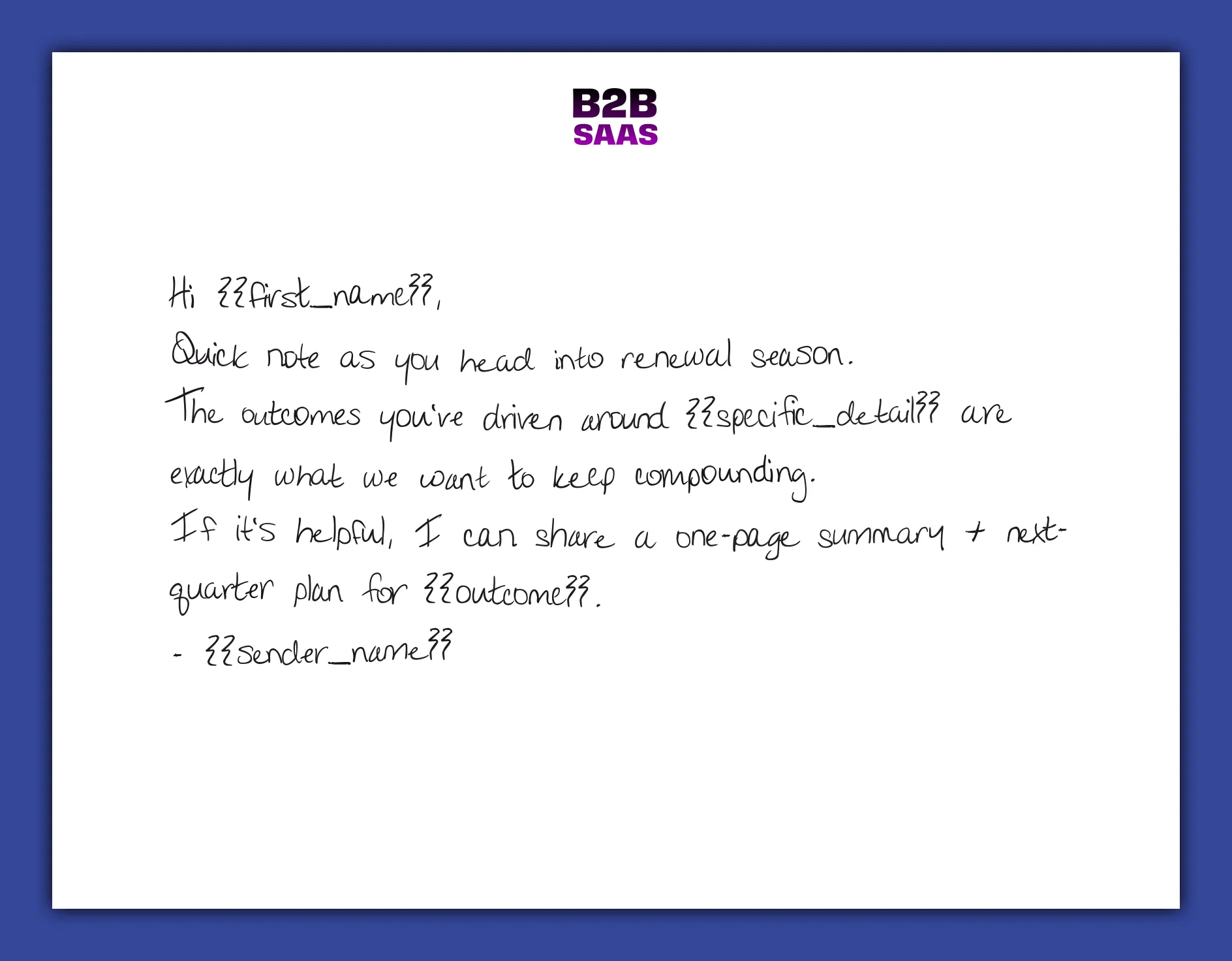
Hi ,
Quick note as you head into renewal season.
The outcomes you've driven around are exactly what we want to keep compounding.
If it's helpful, I can share a one-page summary and next-quarter plan for .
For more CS-specific triggers, use the B2B retention direct mail playbook.
Field model and HubSpot properties
Direct mail workflows usually fail for practical reasons: the address is missing, the wrong owner is mapped, the contact has already been mailed, or the template receives a field it was never designed to print.
Before building the first workflow, agree which HubSpot properties will control eligibility, personalization, and reporting.
Start with the production minimum:
| Property | Purpose | Example |
|---|---|---|
| Name and company | Recipient identity and template context | first name, last name, company name |
| Postal address | Mail production | street, city, state or region, postal code, country |
Then add the controls that make automation useful:
| Property | Purpose | Example |
|---|---|---|
| Contact owner | Sender, task owner, and follow-up routing | AE, SDR, CSM |
| Do-not-mail | Suppression | true or false |
| Last direct mail sent date | Frequency cap | 2026-05-20 |
| Direct mail campaign ID | Reporting key | hubspot_demo_followup_q2_2026 |
| Custom message or intro | Human context | post-meeting sentence, renewal note, event detail |
| Lifecycle stage | Trigger and segmentation when the workflow needs it | MQL, SQL, Opportunity, Customer |
| Account tier or fit | Budget control for selective campaigns | Tier 1, Tier 2, strategic |
For workflow sends, Scribeless receives the contact's name, company, postal address, supported recipient variables, and any HubSpot contact properties you choose to include. Custom variable 1 through custom variable 5 are sent as custom1 through custom5; use these only for values the Scribeless template actually needs to render, such as a reviewed meeting intro, sender name, next step, or QR destination. The HubSpot contact ID is stored as the Scribeless external ID, which gives RevOps a stable source record for reconciliation.
For one-off sends, the same discipline matters. HubSpot maps contact details automatically, then the sender can fill the variables used by the selected Scribeless campaign and tick extra HubSpot properties that should be passed into Scribeless for recipient context or logging.
Use three groups:
| Layer | Example | Who controls it |
|---|---|---|
| Stable template copy | Thank-you, welcome, renewal, event follow-up | Marketing or CS |
| Structured CRM variables | first name, company, owner, lifecycle stage, campaign reason | RevOps |
| Human context | one meeting detail, specific next step, renewal nuance | Rep, CSM, founder, or reviewed AI suggestion |
The practical rule: if a value changes the note, QR destination, or another template-rendered element, map it as a custom variable. If it is only used for eligibility, reporting, or follow-up, keep it as a HubSpot property, task field, or campaign field instead.
Personalized message fields and auto-resizing
This is where Scribeless templates become powerful. Leave a custom message field in the template for the part only a person can write:
{{firstName}}, thanks again for the thoughtful demo conversation.
{{customMessage}}
{{senderName}}
The best custom message field is usually short:
Really enjoyed your point about routing direct mail from high-intent HubSpot lists.
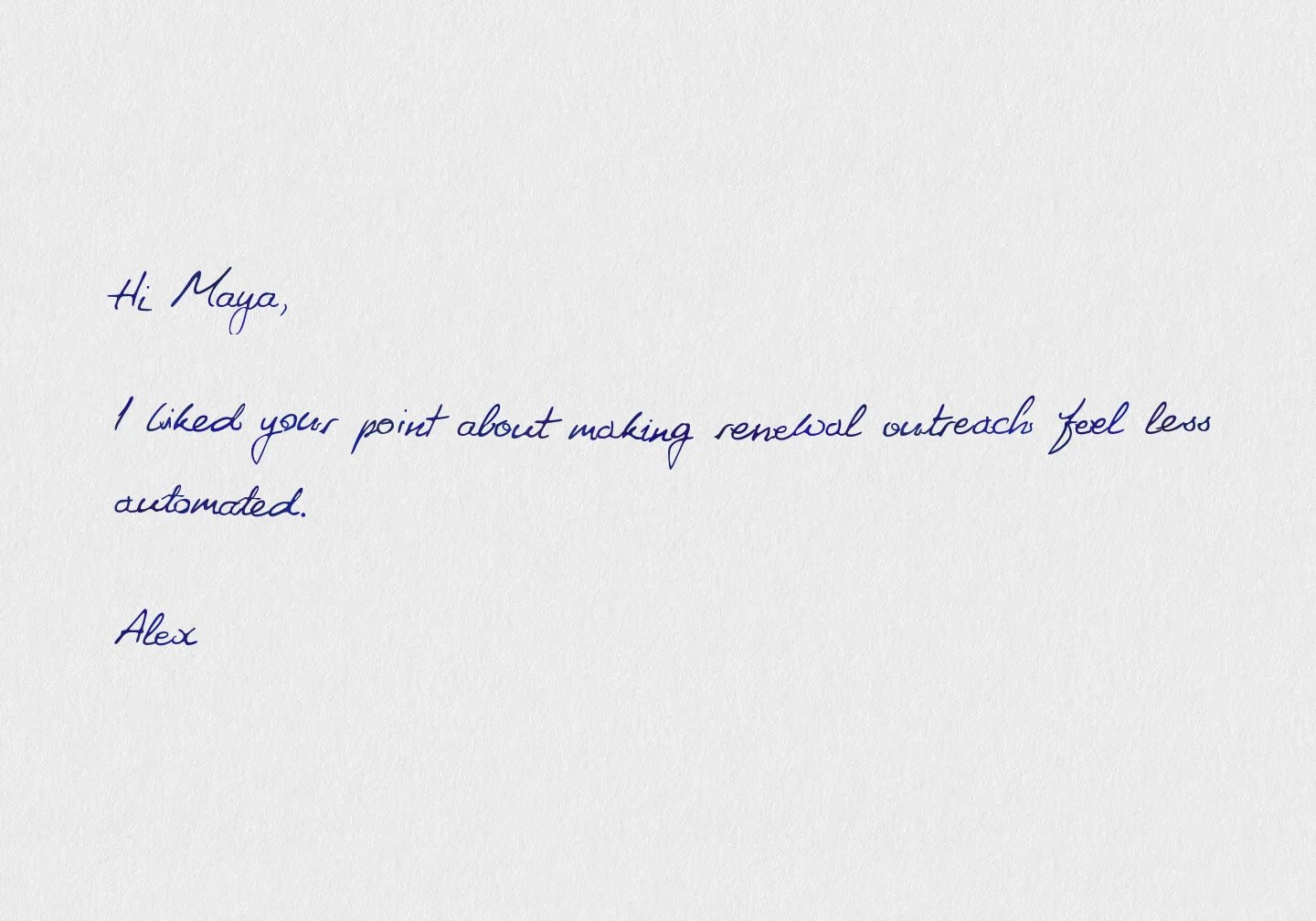
But it can be longer when the relationship justifies it. The sender can add a few words, a few sentences, or a short paragraph. Scribeless handwritten auto-resizing keeps that message inside the approved handwriting area, so normal variation in the personalized part still looks balanced instead of cramped or sparse.
Use the same HubSpot-mapped message field for different approved message lengths:
- short field: one sentence from the rep
- medium field: a reviewed intro from the meeting summary
- long field: a short paragraph for a higher-context manual send
Short fieldone sentence
Medium fieldreviewed intro
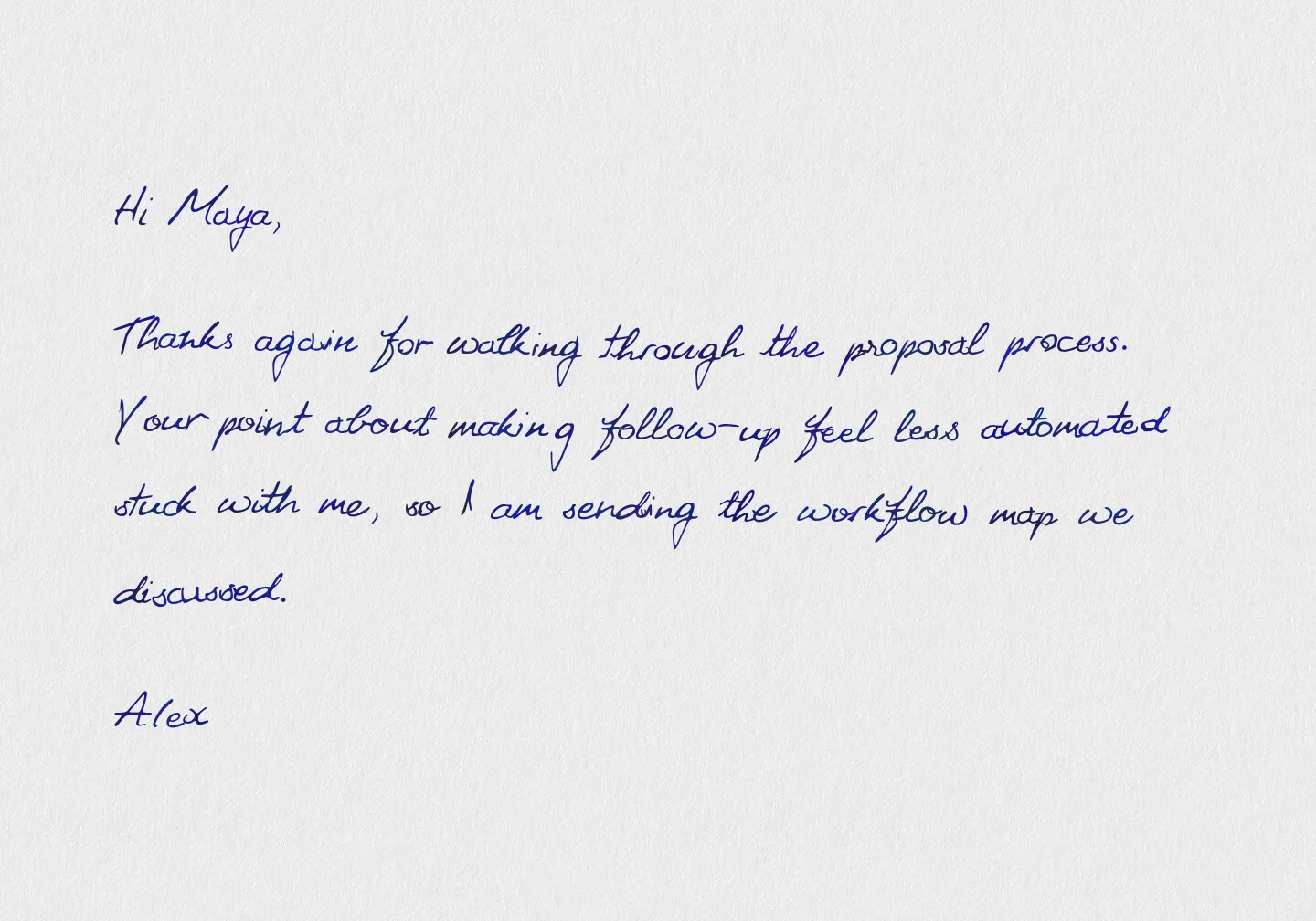
Long fieldshort paragraph
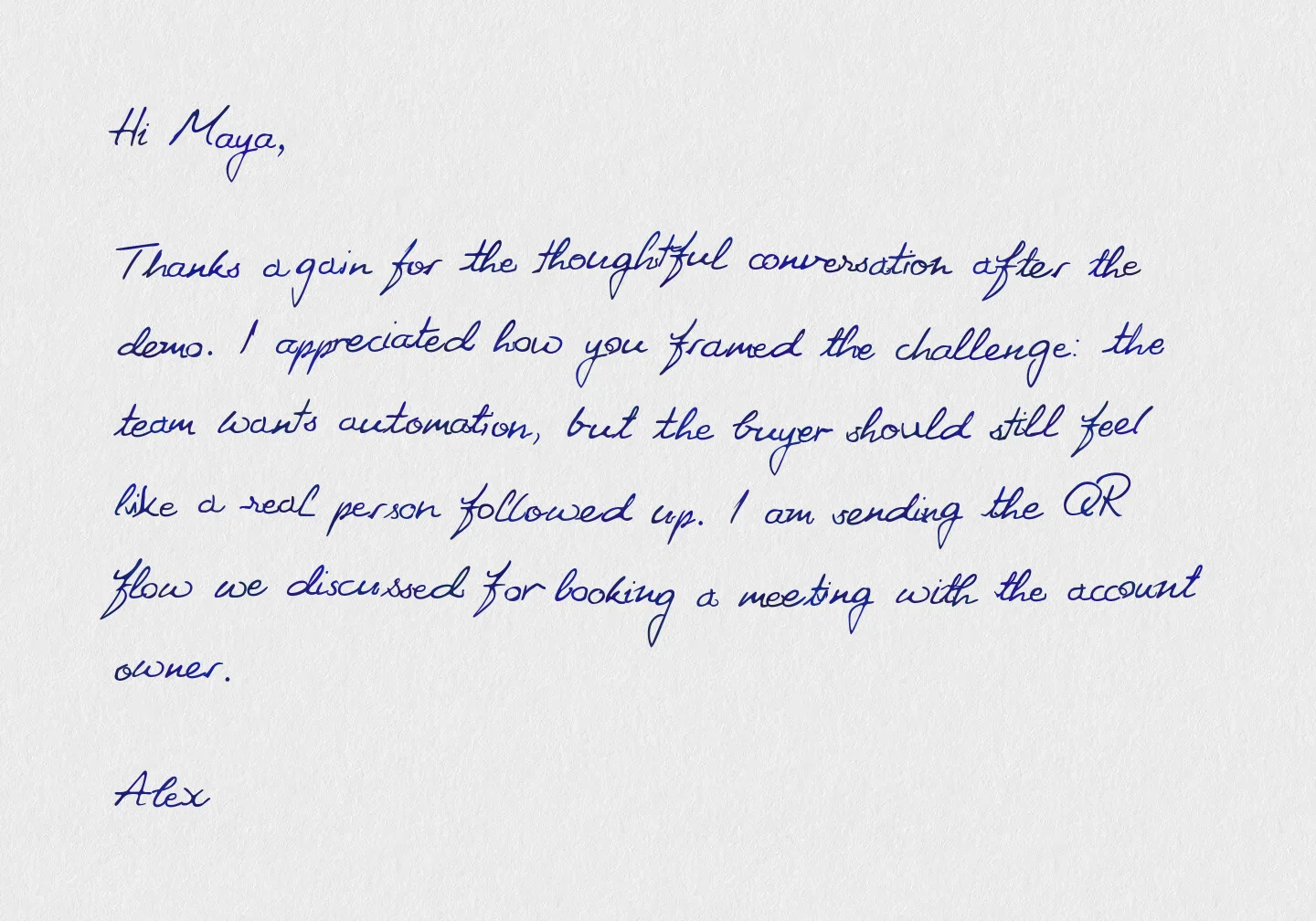
For one-off sends, the sender is responsible for the message. They should write the custom message directly, paste an approved suggestion, or edit AI-drafted copy before creating the Scribeless recipient.
AI-assisted intro line workflow
In HubSpot workflows, the relevant AI actions are under AI. For this use case, the practical starting point is Data Agent: Custom prompt. Use it to draft one short intro line, then route that line through an owner review step before the mailer is created.
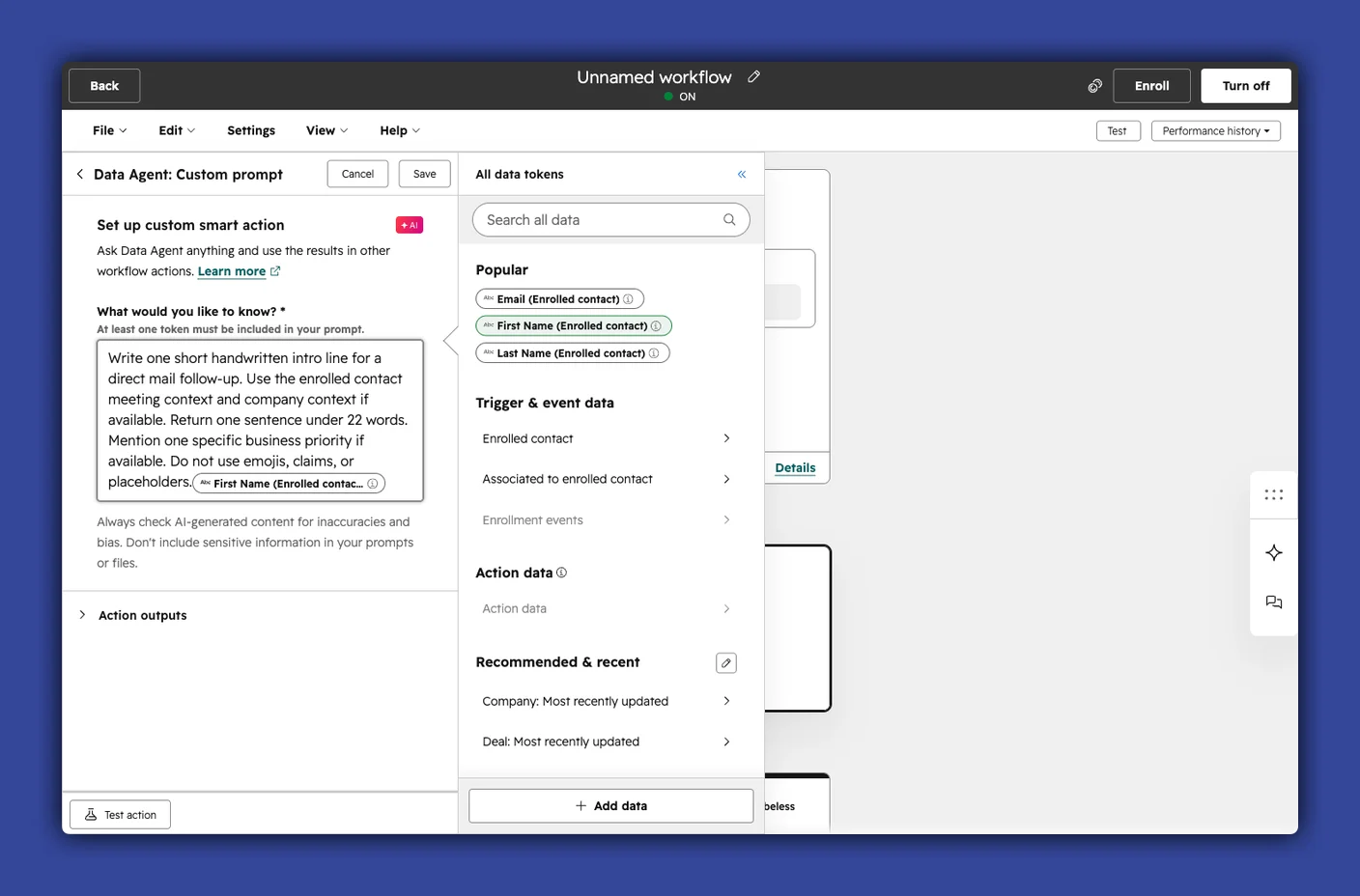
A useful workflow looks like this:
- Enrollment: meeting completed, lifecycle stage changed, high-intent list joined, renewal window opened, or another qualified trigger.
- AI action: ask Data Agent for one intro line under a strict word limit.
- Data tokens: include the contact, company, deal, or meeting fields that make the prompt specific.
- Property update: write the result to a property such as
direct_mail_intro_suggestion. - Owner review: create a HubSpot task asking the owner to approve or edit the line.
- Send path: either let the owner send manually from the contact record, or let a workflow send only when an approved property such as
direct_mail_intro_approvedis true. - Scribeless mapping: map the approved line into a Scribeless custom variable.
Keep the prompt narrow. Ask AI for one sentence that reminds the owner of the most relevant human detail:
Write one short handwritten intro line for a direct mail follow-up.
Use the enrolled contact's meeting context and company context if available.
Return one sentence under 22 words.
Mention one specific business priority if available.
Do not use emojis, claims, or placeholders.
That pattern keeps the scale benefit while preserving the judgment that makes handwritten mail work. The owner still decides whether the line is good enough to mail.
QR tracking and HubSpot follow-up
The minimum useful reporting loop is:
- HubSpot enrolls or sends the contact.
- Scribeless creates the recipient with a stable campaign ID and HubSpot contact ID.
- HubSpot stores the last mail date and campaign ID.
- The owner gets a follow-up task after the expected delivery window.
- QR scans, replies, meetings, or stage movement are reviewed against the mailed cohort.
Recommended HubSpot properties:
| Property | Type | Why |
|---|---|---|
direct_mail_last_sent_at | date | frequency cap and recent-touch reporting |
direct_mail_last_campaign_id | text | campaign-level matchbacks |
direct_mail_suppressed | boolean | explicit do-not-mail control |
direct_mail_last_trigger | text | explains why the workflow fired |
direct_mail_holdout_group | boolean or dropdown | compares mailed vs unmailed cohorts |
direct_mail_followup_due_at | date | owner task timing |
QR scans help explain one response path. Many good direct mail touches work by improving reply rate, meeting conversion, deal velocity, renewal confidence, or owner follow-up quality.
If the mailer uses a QR code, treat the scan as a HubSpot signal that can update the contact and route follow-up. The simplest pattern is:
- The QR code points to a redirect or tracking URL for that campaign.
- If the Scribeless template uses a variable-driven QR destination, map one custom variable to the contact owner's meeting URL or another campaign-specific destination.
- The scan identifies the campaign, recipient, and HubSpot contact ID where possible.
- The scan updates HubSpot properties such as
direct_mail_last_qr_scanned_at,direct_mail_last_qr_campaign_id, anddirect_mail_last_qr_destination. - A HubSpot workflow branches from that property update.
Useful follow-up workflows:
| QR signal | HubSpot action | Why |
|---|---|---|
| Scan on a demo follow-up note | Create a task for the contact owner | The recipient showed interest after the physical touch |
| Scan to a HubSpot meeting link, but no meeting booked | Create a follow-up task or send a reminder email | The CTA had intent, but the conversion did not complete |
| Scan to a proposal, pricing page, or customer story | Update lead score and notify the AE | The scan adds context to sales follow-up |
| Scan on a renewal note | Notify the CSM and add the contact to a renewal review list | The account engaged before the commercial conversation |
For HubSpot meeting-link CTAs, keep the booking event separate from the scan event. A scan tells you the recipient looked. A booked meeting tells you the CTA converted. Reporting should show both so the team can see where the drop-off happened.
For the mechanics of QR codes, redirects, CRM logging, and matchbacks, see the direct mail tracking stack guide.
Guardrails before launch
Before turning on a HubSpot direct mail workflow, make these decisions explicit:
- Enrollment: Which exact contact workflow can send mail?
- Re-enrollment: Can the same contact enter again? If yes, after how long?
- Suppression: Which HubSpot property blocks direct mail?
- Frequency cap: What is the minimum gap between mail touches?
- Address quality: Which address fields must be present before the action runs?
- Ownership: Who gets the follow-up task after delivery?
- Campaign ID: Which stable ID connects HubSpot reporting to Scribeless recipients?
- QR routing: Does the QR destination resolve to the intended meeting link, proposal, or campaign-specific page?
- Holdout: Is a small control group needed before scaling?
Test with one contact you control. Confirm the contact appears in the right Scribeless campaign, the postal fields are complete, the custom variables have the expected values, and the HubSpot contact ID is available as the external ID.
Then test the failure paths. Try a contact with an incomplete address. Try a suppressed contact. Try a contact who was mailed recently. A good workflow should do nothing when the send would be wrong.
What to build first
Start with one automated send and one manual send.
Automate a completed-demo workflow first because the trigger is clear and the follow-up owner is obvious. Then give reps or CSMs the contact-record send for high-context notes: a thoughtful meeting follow-up, a strategic buyer, a renewal nuance, or a founder-led note.
The goal is better-timed, more specific mail. Generic notes to everyone defeat the point.
Want help designing a HubSpot direct mail program around workflows, contact-record sends, and custom Scribeless template fields? Talk to Scribeless.