Introduction: direct mail is trackable when the stack exists first
Direct mail gets called "hard to measure" when teams launch the campaign before they design the tracking system.
That is the wrong order.
In a B2B program, the tracking stack should be planned before the first note, card, letter, or QR code goes to print. RevOps needs consistent campaign IDs. Demand gen needs clean channel reporting. ABM teams need account-level outcomes. Lifecycle and customer teams need to know whether mail changed behavior after a trigger such as a demo, stalled opportunity, renewal window, or executive milestone.
This guide is practical: it shows the minimum architecture needed to connect offline mail to web analytics, CRM activity, pipeline outcomes, and incrementality testing without pretending that QR scans alone prove ROI.
If you need the broader attribution model first, start with direct mail attribution for B2B. This post focuses on the implementation layer: redirects, QR codes, UTMs, events, CRM fields, matchbacks, and operating rules.
The stack at a glance
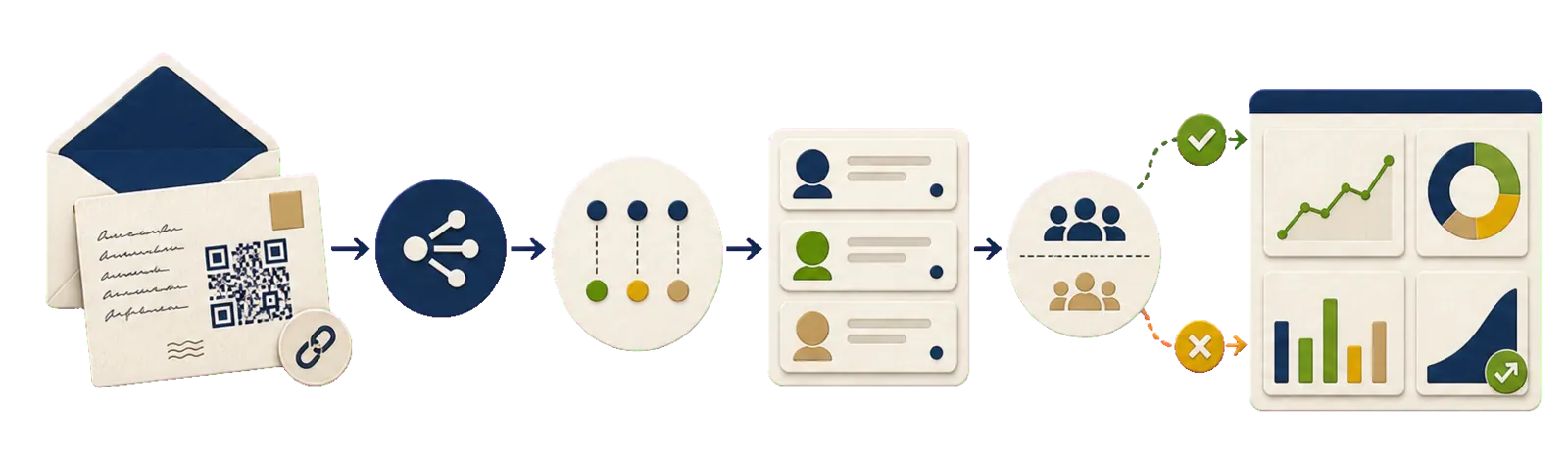
A reliable B2B direct mail tracking stack has eight layers:
- Campaign taxonomy, so every send has a durable ID.
- Redirect links, so printed URLs can be controlled after launch.
- QR codes and short URLs, so recipients can respond with low friction.
- Landing pages, so the post-scan experience matches the mail.
- Web analytics, so scans, visits, and conversions are visible.
- CRM logging, so mail touches sit next to meetings, opportunities, and revenue.
- Matchbacks, so mailed cohorts can be compared against downstream outcomes.
- Holdouts, so scaled programs can separate correlation from lift.
You do not need all eight layers on day one. You do need to know which layer is missing when someone asks, "Did this campaign work?"
Minimum viable tracking stack
For most B2B teams, the first useful version is smaller than a full attribution platform. It should answer four questions:
| Layer | Minimum setup | Why it matters | Example |
|---|---|---|---|
| Campaign ID | One mail_campaign_id for every send | Keeps reporting comparable across CRM, analytics, and automation tools | abm_q2_2026_tier1_demo_followup |
| Redirect URL | QR and short URL point to a redirect you control | Lets you standardize UTMs, change destinations, and log scans | /r/abm-q2-tier1-demo |
| Landing page | One page or path built for the mail offer | Prevents high-intent traffic from landing on a generic homepage | /demo/direct-mail-followup |
| GA4 events | Scan, landing page view, and primary conversion | Shows whether the response path is functioning | direct_mail_scan, generate_lead |
| CRM activity | "Direct mail sent" logged on contact, account, or campaign member | Makes pipeline and revenue matchbacks possible | HubSpot activity or Salesforce Campaign Member |
| Matchback report | Mailed cohort compared over a fixed window | Moves reporting from anecdotes to outcomes | 30-day meetings and opps after send |
This is the floor. Once this is stable, add holdouts, per-recipient links, deeper journey analytics, and automated routing through tools such as Zapier, Make, HubSpot, or Salesforce.
Step 1: decide what the campaign is supposed to prove
Before you design QR codes or events, define the decision the data will support.
For outbound and ABM teams, the main question is usually:
"Did mailed accounts create more qualified conversations, opportunities, or progression than similar accounts that did not receive mail?"
For lifecycle and customer teams, it might be:
"Did the mail touch increase renewal engagement, expansion conversations, event attendance, or executive sponsor response?"
The key is to pick one primary outcome per motion. A QR scan is a signal. A booked meeting, created opportunity, stage change, renewal action, or expansion conversation is closer to the business outcome.
Useful primary outcomes by motion:
| Motion | Better primary outcome | Useful secondary signals |
|---|---|---|
| Tier 1 ABM | Meetings booked or opportunities created | QR scans, landing page visits, replies |
| Post-demo sales follow-up | Opportunity progression or next meeting booked | Owner task completion, page engagement |
| Event follow-up | Post-event meetings or opportunities influenced | QR scans, RSVP confirmations |
| Renewal | Renewal meeting booked or risk resolved | Sponsor engagement, support page views |
| Expansion | Expansion opportunity created | Product page visits, champion replies |
If the outcome is pipeline or retention, the CRM needs to be the system of record. GA4 can tell you whether the response path works. It should not be asked to carry the whole revenue story.
Step 2: standardize campaign taxonomy before launch
Tracking breaks when every campaign names the same concept differently.
Create a small taxonomy and use it everywhere: in the mail platform, redirect system, GA4 parameters, automation payloads, and CRM records.
Minimum fields:
mail_campaign_id: one ID for the campaign, motion, or experiment.mail_template_id: creative or copy version.mail_segment: audience group such as tier, persona, industry, lifecycle stage, or trigger.mail_touch_date: date the item entered production or was sent.trigger_reason: why this person or account qualified.holdout_group:testorcontrolwhen you are running incrementality tests.
Example naming convention:
| Field | Example value |
|---|---|
mail_campaign_id | abm_q2_2026_tier1_demo_followup |
mail_template_id | exec_note_v2 |
mail_segment | tier1_cfo_saas |
trigger_reason | demo_completed |
mail_touch_date | 2026-04-20 |
holdout_group | test |
Use lowercase, underscores or hyphens, and stable terms. Avoid campaign names that only make sense to the person who built the first version.
This same discipline matters upstream too. If addresses, CRM IDs, and account ownership are unreliable, matchbacks become painful fast. The list operations side is covered in B2B mailing list hygiene and enrichment.
Step 3: make redirect links the foundation
The most important tracking primitive is not the QR code. It is the redirect URL behind the QR code.
Print a URL you control:
https://example.com/r/abm-q2-tier1-demo
Then have that redirect forward to the final destination with consistent UTMs:
https://example.com/demo/direct-mail-followup?utm_source=direct_mail&utm_medium=qr&utm_campaign=abm_q2_2026_tier1_demo_followup&utm_content=exec_note_v2&utm_term=tier1_cfo_saas
Redirects matter because they let you:
- change the destination without reprinting
- enforce UTM consistency
- log the scan or visit before forwarding
- split traffic between landing page variants
- route different segments to different offers
- preserve a readable fallback URL for people who do not scan
For B2B teams, QR codes should normally point to the redirect, not directly to the landing page. The printed asset stays stable. The destination can evolve.
Step 4: use QR codes to capture intent, not to declare ROI
QR codes reduce friction. They also create a useful "recipient took action" signal. They do not, by themselves, prove revenue impact.
Use QR codes when the next action is obvious:
- scan to book a meeting
- scan to RSVP
- scan to unlock a tailored offer
- scan to confirm details
- scan to route a customer request to the right owner
For some audiences, a short URL should sit near the QR code. This is especially useful in executive mail, where the recipient may hand the piece to an assistant or type the URL later.
Scribeless programmatic direct mail flows can also treat a QR scan as an automation trigger. For example, a scan can emit an analytics event, update a lifecycle field, create an owner task, and move the account into a follow-up sequence.
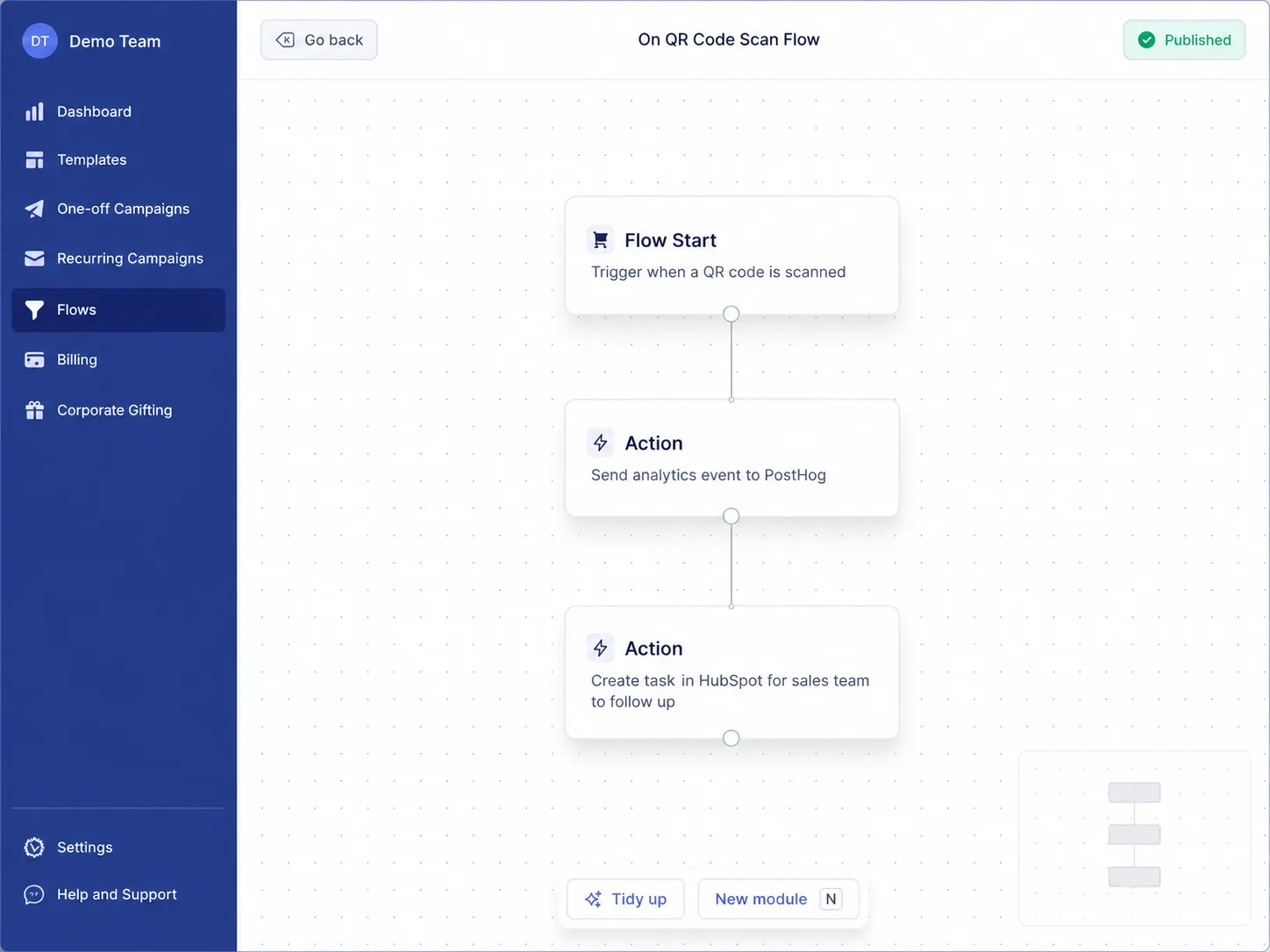
The operational principle is simple: one scan should not just become a pageview. It should become a usable signal in the rest of the revenue stack.
Step 5: build landing pages for mail traffic
Do not send high-intent mail traffic to a generic homepage.
Direct mail recipients usually need context:
- Why did I receive this?
- What should I do next?
- Is this relevant to my role, account, or recent action?
- Can I respond quickly?
A strong mail landing page has:
- message match with the note, card, or letter
- one primary CTA
- fast mobile performance
- short form or calendar flow for warm outbound
- proof that matches the segment
- hidden fields or URL parameters that preserve campaign metadata
The offer should also fit the format. A handwritten executive note, printed postcard, and hybrid package do not create the same expectations. If you are choosing formats by motion, use printed vs handwritten vs hybrid for B2B direct mail as a companion.
Step 6: set UTM and GA4 conventions
GA4 is useful for validating response behavior, diagnosing broken paths, and comparing landing page performance. It should be simple, consistent, and connected to the same campaign taxonomy used in the CRM.
Recommended UTM convention:
| Parameter | Recommended value | Notes |
|---|---|---|
utm_source | direct_mail | Keep source stable across all campaigns |
utm_medium | qr, short_url, or purl | Use the actual response mechanism |
utm_campaign | mail_campaign_id | Must match CRM campaign ID |
utm_content | mail_template_id | Use for creative or copy variant |
utm_term | mail_segment | Useful for tier, persona, or audience group |
Example URL:
https://example.com/demo/direct-mail-followup?utm_source=direct_mail&utm_medium=qr&utm_campaign=abm_q2_2026_tier1_demo_followup&utm_content=exec_note_v2&utm_term=tier1_cfo_saas
Recommended GA4 events:
| Event | When it fires | Required parameters |
|---|---|---|
direct_mail_scan | Redirect receives a QR or short URL hit | mail_campaign_id, mail_template_id, mail_segment, redirect_id |
direct_mail_landing_view | Mail landing page loads | mail_campaign_id, mail_segment, landing_page_id |
direct_mail_cta_click | Primary CTA clicked | mail_campaign_id, cta_id |
generate_lead or book_meeting | Form submit or calendar booking completes | mail_campaign_id, conversion_type |
Example event payload:
{
  "event": "direct_mail_scan",
  "mail_campaign_id": "abm_q2_2026_tier1_demo_followup",
  "mail_template_id": "exec_note_v2",
  "mail_segment": "tier1_cfo_saas",
  "trigger_reason": "demo_completed",
  "redirect_id": "r_abm_q2_tier1_demo",
  "utm_source": "direct_mail",
  "utm_medium": "qr"
}
If you use product analytics tools, the same scan can be returned to Amplitude or Mixpanel as an offline engagement event. That is useful when audience membership, lifecycle stage, or product behavior determines who receives mail next.
Step 7: log mail touches in HubSpot and Salesforce
For B2B measurement, the CRM is where direct mail becomes accountable to pipeline.
The minimum CRM requirement is simple: every mailed contact or account should carry a durable record that says what was sent, when it was sent, why it was sent, and which campaign it belonged to.
HubSpot example
In HubSpot, a practical setup could use a combination of lists, workflows, activities, and custom properties.
Implementation pattern:
- A workflow enrolls contacts or companies when they meet the trigger criteria, such as lifecycle stage, deal stage, account tier, or renewal date.
- The workflow sends the contact data and campaign metadata to Scribeless directly or through an automation layer.
- HubSpot records a "Direct mail sent" activity or updates custom properties.
- When a QR scan or conversion happens, the event returns to HubSpot to create a task, update a property, or branch another workflow.
Useful HubSpot properties:
| Property | Example |
|---|---|
last_direct_mail_campaign_id | abm_q2_2026_tier1_demo_followup |
last_direct_mail_sent_date | 2026-04-20 |
last_direct_mail_template_id | exec_note_v2 |
last_direct_mail_scan_date | 2026-04-25 |
direct_mail_holdout_group | test |
This matches the integration pattern described on the HubSpot integration page: CRM milestones can trigger handwritten follow-up, and QR scan engagement can come back into HubSpot for owner follow-up or workflow branching.
Salesforce example
In Salesforce, the cleanest model depends on how your team reports campaigns, but a common pattern is:
- Create a Salesforce Campaign for the direct mail motion.
- Add Leads or Contacts as Campaign Members.
- Store segment, template, send date, trigger reason, and holdout group on Campaign Member fields.
- Trigger the send through Salesforce Flow, a webhook, Zapier, Make, or an internal service.
- Update Campaign Member Status when the recipient is mailed, scans, converts, or books a meeting.
Example Campaign Member statuses:
| Status | Meaning |
|---|---|
Eligible | Qualified for the campaign |
Mailed | Mail touch sent |
Scanned QR | Redirect or QR event recorded |
Converted | Form, meeting, or target action completed |
Control | Qualified but held out |
This aligns with the Salesforce integration page, where Salesforce stages and workflows trigger sends and QR scan engagement can create tasks or update fields for rep follow-up.
For either CRM, keep the workflow boring and durable. The win is not a complex object model. The win is being able to answer whether mailed accounts moved differently from comparable unmailed accounts.
For the trigger and field setup behind those CRM touches, use the HubSpot and Salesforce direct mail workflow recipes.
Step 8: run matchbacks by cohort and window
Matchbacks connect the mailed cohort to outcomes that happen after the send.
The basic method:
- Define the cohort: everyone mailed in
mail_campaign_id = abm_q2_2026_tier1_demo_followup. - Define the entity: contact, lead, account, opportunity, or customer.
- Define the window: 14, 30, 60, or 90 days after
mail_touch_date. - Pull outcomes from the CRM: meetings, opportunities created, stage movement, closed won revenue, renewal actions.
- Compare against a baseline or holdout group.
Example matchback report
Imagine a Tier 1 ABM campaign mailed to 400 contacts across 175 target accounts after a demo or late-stage engagement signal.
| Metric | Mailed cohort | Holdout or comparable cohort | Notes |
|---|---|---|---|
| Contacts | 400 | 100 | Same eligibility rules |
| Accounts | 175 | 45 | Account-level reporting matters more than contact-level scans |
| 30-day QR or URL response | 52 | 0 | Response signal only |
| 30-day meetings booked | 31 | 5 | Better business signal |
| 60-day opportunities created | 14 | 2 | Primary pipeline signal |
| 90-day stage progression | 9 | 1 | Useful for late-stage programs |
This example does not claim a universal benchmark. It shows the shape of the report. Your actual readout should include audience quality, trigger logic, sales follow-up, offer, format, and campaign cost.
The hardest part is usually not the math. It is making sure the mailed list can be matched to CRM records cleanly. That is why campaign IDs, account IDs, contact IDs, and send dates need to be present before the campaign launches.
If the companion analysis is available, use direct mail ROI for B2B to connect matchback outputs to cost, payback, and budget decisions.
Step 9: add holdouts when the program is ready to scale
Matchbacks show correlation. Holdouts estimate lift.
Use holdouts when:
- the program has enough volume to compare groups
- leadership is making a budget decision
- direct mail is being added to an already active sales or lifecycle motion
- you need to know whether mail changed the outcome, not just whether mailed people converted
Simple pattern:
- Define eligible recipients.
- Randomly assign 10 to 20 percent to a control group.
- Do not mail the control group.
- Keep sales follow-up and other channels as consistent as practical.
- Compare outcomes over the same time window.
Store the holdout flag in the CRM:
direct_mail_holdout_group = test
direct_mail_holdout_group = control
Then report on meetings, opportunities, renewal actions, or revenue by group. QR scans stay useful for operational reporting, but lift should be judged on business outcomes.
Implementation paths
The right architecture depends on speed, scale, and how much engineering support you have.
If the mail provider needs to support the tracking layer directly, evaluate whether it can act as a direct mail platform with QR tracking before the campaign is printed.
Option A: CRM-native workflow
Best when the direct mail action can sit inside HubSpot or Salesforce.
Use this when:
- RevOps owns the workflow
- campaign volume is moderate
- CRM fields are clean
- sales follow-up is the main downstream action
Option B: automation layer with Zapier or Make
Best for quick launches, pilots, and cross-tool routing.
Use Zapier or Make when you need to:
- trigger sends from multiple systems
- route QR scan events into another tool
- add simple approval or QA steps
- test the motion before engineering builds a service
Option C: internal mail router
Best for mature programs with multiple triggers, segments, and experiments.
An internal router can:
- validate required fields
- enforce frequency caps
- choose templates by segment
- generate redirect IDs
- send analytics events
- update CRM status
- maintain suppression logic
Regardless of implementation path, the measurement logic stays the same:
campaign IDs -> redirects -> QR/URL events -> landing conversions -> CRM outcomes -> matchbacks -> holdouts
Common tracking mistakes
Treating QR scans as ROI
QR scans tell you someone responded. They do not tell you whether the campaign created pipeline, accelerated a deal, or improved retention.
Printing URLs you cannot control
If the QR code points straight to a static landing page, every destination change becomes harder. Use redirects.
Using different campaign IDs in every tool
If GA4 says q2_mail_test, HubSpot says ABM Demo Follow-Up, and Salesforce says DM-0426-A, reporting will require manual cleanup. Pick one ID.
Forgetting the fallback URL
Some recipients will not scan. A short readable URL that routes through the same redirect system preserves attribution and improves accessibility.
Sending to records with weak CRM matching
If recipients cannot be mapped back to contacts, accounts, or campaign members, matchbacks become unreliable.
Changing copy, offer, list, and format at once
One campaign can teach you very little if every variable changes at the same time. For ABM sequencing, the patterns in using direct mail with multi-touch campaigns help keep the offline touch connected to the broader cadence.
Implementation checklist
Use this as a pre-launch QA sequence:
- Define the primary outcome for the campaign.
- Create the
mail_campaign_id,mail_template_id, andmail_segment. - Confirm each recipient maps to a CRM contact, lead, account, or campaign member.
- Generate redirect URLs before QR codes are printed.
- Add UTMs using the same campaign taxonomy as the CRM.
- Create a mail-specific landing page with one primary CTA.
- Fire GA4 events for scan, landing view, CTA click, and conversion.
- Log the mail touch in HubSpot or Salesforce.
- Return QR scan and conversion events to the CRM or automation layer.
- Run a 30, 60, or 90-day matchback.
- Add a holdout group before scaling spend.
FAQ
What is a direct mail tracking stack?
A direct mail tracking stack is the set of IDs, redirects, QR codes, landing pages, analytics events, CRM records, matchback reports, and holdout rules that connect mailed recipients to measurable business outcomes.
Are QR codes enough to track direct mail?
No. QR codes are useful for response tracking, but they are not enough for B2B attribution. Use QR scans as one event in a stack that also includes CRM logging, matchbacks, and, when scale allows, holdouts.
Should each recipient get a unique QR code?
Sometimes. Campaign-level or segment-level QR codes are simpler and often enough for early programs. Per-recipient QR codes are useful when you need person-level attribution, personalized landing pages, or precise sales routing. They require stronger data handling and QA.
What should GA4 track for direct mail?
At minimum, track QR or short URL scans, landing page views, CTA clicks, and conversions. Use consistent parameters such as mail_campaign_id, mail_template_id, and mail_segment so GA4 reporting can be matched to CRM records.
How do HubSpot and Salesforce fit into direct mail tracking?
HubSpot and Salesforce should hold the pipeline view. Log the mail touch, campaign ID, send date, template, segment, and holdout group in the CRM. Then return scan and conversion events so reps and workflows can respond to offline intent.
How long should the matchback window be?
Use the sales motion as the guide. A meeting follow-up may need a 14 or 30-day window. Enterprise ABM, renewal, or late-stage opportunity programs may need 60 or 90 days. Keep the window consistent within each campaign type.
When should we use holdouts?
Use holdouts when the campaign is large enough to compare groups and the result will influence budget or strategy. If the program is still a small pilot, start with clean tracking and matchbacks, then add holdouts when volume supports it.
Conclusion: audit the stack before you scale the spend
Direct mail becomes measurable when the tracking stack is designed before launch. The best teams do not stop at "we printed a QR code." They connect offline touches to web behavior, CRM activity, pipeline reporting, and holdout-based learning.
If your team is planning an ABM, lifecycle, event, or customer program, Scribeless can help map the tracking stack before production: campaign IDs, QR and redirect structure, GA4 events, CRM fields, automation handoffs, matchback windows, and holdout design.
Ready to audit your direct mail tracking stack? Book a campaign consult and we will help you map the path from mailed touch to measurable outcome.