Introduction: list quality is the hidden ROI driver
Direct mail has two cost centers:
- the mail itself
- wasted sends caused by bad data
In B2B, “bad data” shows up as:
- contacts who moved roles
- outdated office addresses (or remote employees)
- mismatched names/titles
- duplicate contacts across systems
- missing country/state formatting
This guide covers how to build a mailing list that doesn’t burn budget—and how to keep it clean over time.
If you want the basics first, see: Finding great data for direct mail campaigns.
What “good” looks like (B2B list quality checklist)
For each contact, aim for:
- full name (first + last)
- role/title (and seniority if you track it)
- company name + website domain
- validated postal address (with country)
- segmentation fields (tier, persona, region, industry)
- a suppression flag (do-not-mail)
- last-updated timestamp (or “address_last_verified_at”)
For the list overall:
- deduped by person + company
- frequency caps possible (needs last mail date)
- audit trail for where data came from
If you only do one thing, do this: separate “address we have” from “address we trust.”
Where B2B mailing addresses come from (and trade-offs)
1) First-party (best)
- event registrations
- demo request forms
- customer onboarding forms
Best practice: ask for “shipping address” vs “office address” to match remote reality.
2) CRM / sales engagement tools
Often incomplete or out of date—treat as a starting point, not truth.
3) Enrichment and data providers
High coverage, variable accuracy. Always validate and refresh.
4) Manual collection (for Tier 1)
For high-value accounts, manual verification is often worth it.
How to ask for addresses without killing conversion
Most teams avoid collecting addresses because they assume it hurts conversion. In B2B, it doesn’t have to—if you attach it to a reasonable promise.
Patterns that work:
- “Where should we send the follow-up?” after a demo/workshop (frames it as useful, not invasive)
- “Shipping address for a sample / kit” (clear value exchange)
- “Office or home?” with a “best for delivery” explanation (respects remote reality)
- Optional field + fallback: collect city/state/country if they won’t share full address yet
Keep the form simple:
- one “shipping address” field (multi-line)
- country (dropdown)
- optional “delivery notes” (suite, floor, reception)
Enrichment workflow (recommended)
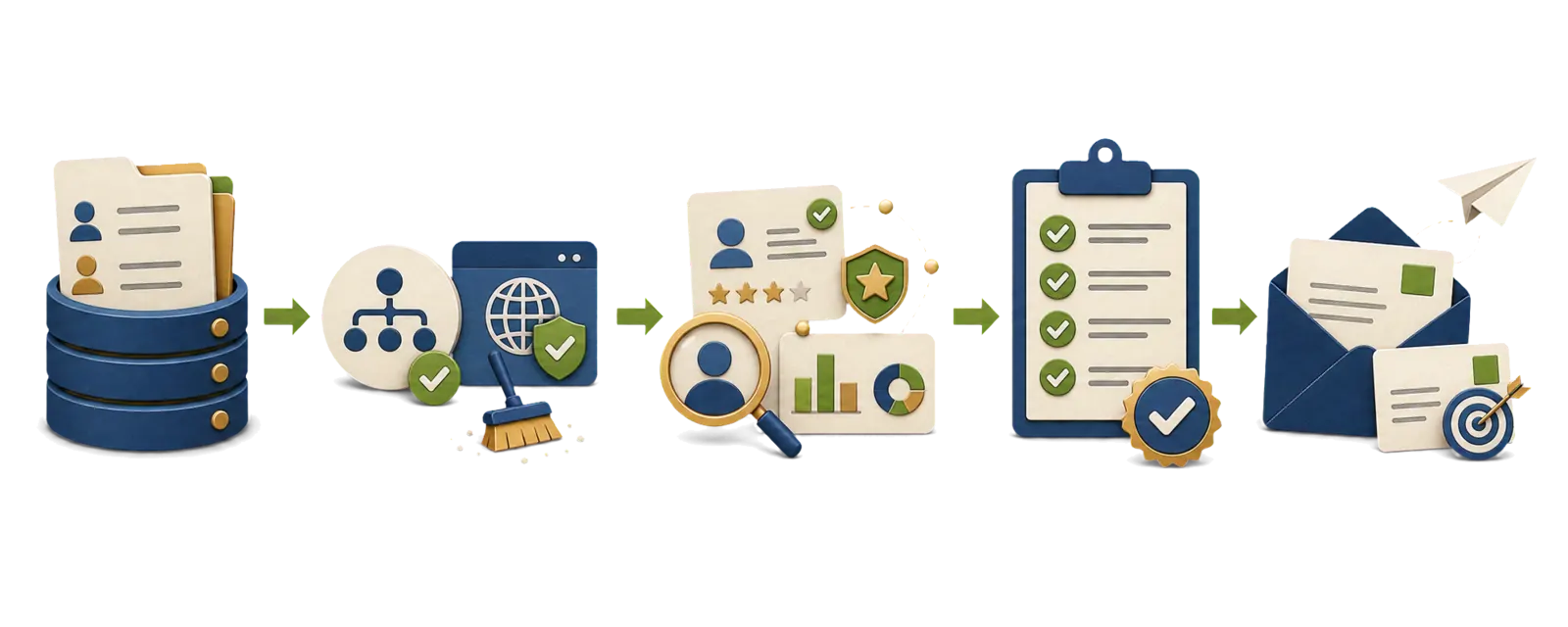
Start simple:
- normalize company domains (dedupe)
- enrich company firmographics (size, industry)
- enrich contacts (role, seniority)
- enrich addresses
- validate + flag “uncertain” records
If you’re using Clay for enrichment workflows, we’ll cover a step-by-step ABM example in: Clay + Scribeless for ABM: Personalize Handwritten Mail at Scale.
Hygiene: the 6 fixes that reduce wasted sends
1) Deduplicate aggressively
Common duplicates:
- “James Smith” vs “Jim Smith”
- shared addresses across multiple contacts
- same person across multiple systems
2) Add “do not mail” flags and respect them
Reasons:
- requested suppression
- compliance restrictions
- competitor/partner nuance
3) Track recency (and refresh)
If address age > 6–12 months, treat it as suspect for non-customers.
4) Handle remote work explicitly
Add fields:
- address_type (home / office / unknown)
- delivery_notes (optional)
5) Normalize international addresses
Always store:
- country
- region/state
- postal code
6) Create an “address confidence score”
Even a simple 3-level score helps:
- verified
- likely
- unknown
Address validation: the minimum you should do
Even “pretty good” addresses create expensive failure modes (returned mail, dead offices, bad matchbacks).
A practical baseline:
- standardize formatting (so “St.” and “Street” don’t create duplicates)
- validate required components (street + city + region + postal + country)
- flag deliverability risks (missing unit/suite, invalid postal code, nonstandard region)
- spot-check Tier 1 manually (10–20 records per batch)
If you operate internationally, make “country” non-negotiable. Missing country is one of the fastest ways to create waste.
Compliance and ethics (high-level)
Direct mail rules vary by country and industry. Keep it simple (and involve your legal/compliance team if you’re regulated):
- honor suppression requests quickly
- don’t mail sensitive personal data
- avoid anything that feels like surveillance (“receipt test”)
- store provenance (where the address came from) so you can respond to questions
Note: this is not legal advice—treat it as an ops checklist to reduce risk.
How list quality ties to measurement
If your list is messy, your attribution will be messy:
- you can’t match back to CRM reliably
- you can’t segment results by tier/persona
- you can’t run holdouts cleanly
For measurement fundamentals, see: How to track direct mail marketing campaigns.
Pre-send QA checklist (copy/paste for RevOps)
Before you queue a send, confirm:
- every record has:
first_name,last_name,company,country,postal_code do_not_mailis enforced everywhere (no “side lists” bypass it)address_confidenceis notunknownfor Tier 1/Tier 2- duplicates are removed (person + company + address)
- a
mail_campaign_idis assigned for reporting - a
last_mailed_atupdate is part of the workflow (so frequency caps work)
Conclusion
Better mail creative helps.
But better data often helps more—because it compounds:
- fewer wasted sends
- higher relevance
- cleaner measurement
- stronger ROI decisions
Want help turning your list + triggers into a repeatable direct mail motion? Book a campaign consult