What this guide helps you build
Use Attio as the place where a teammate checks relationship context before a handwritten note is sent.
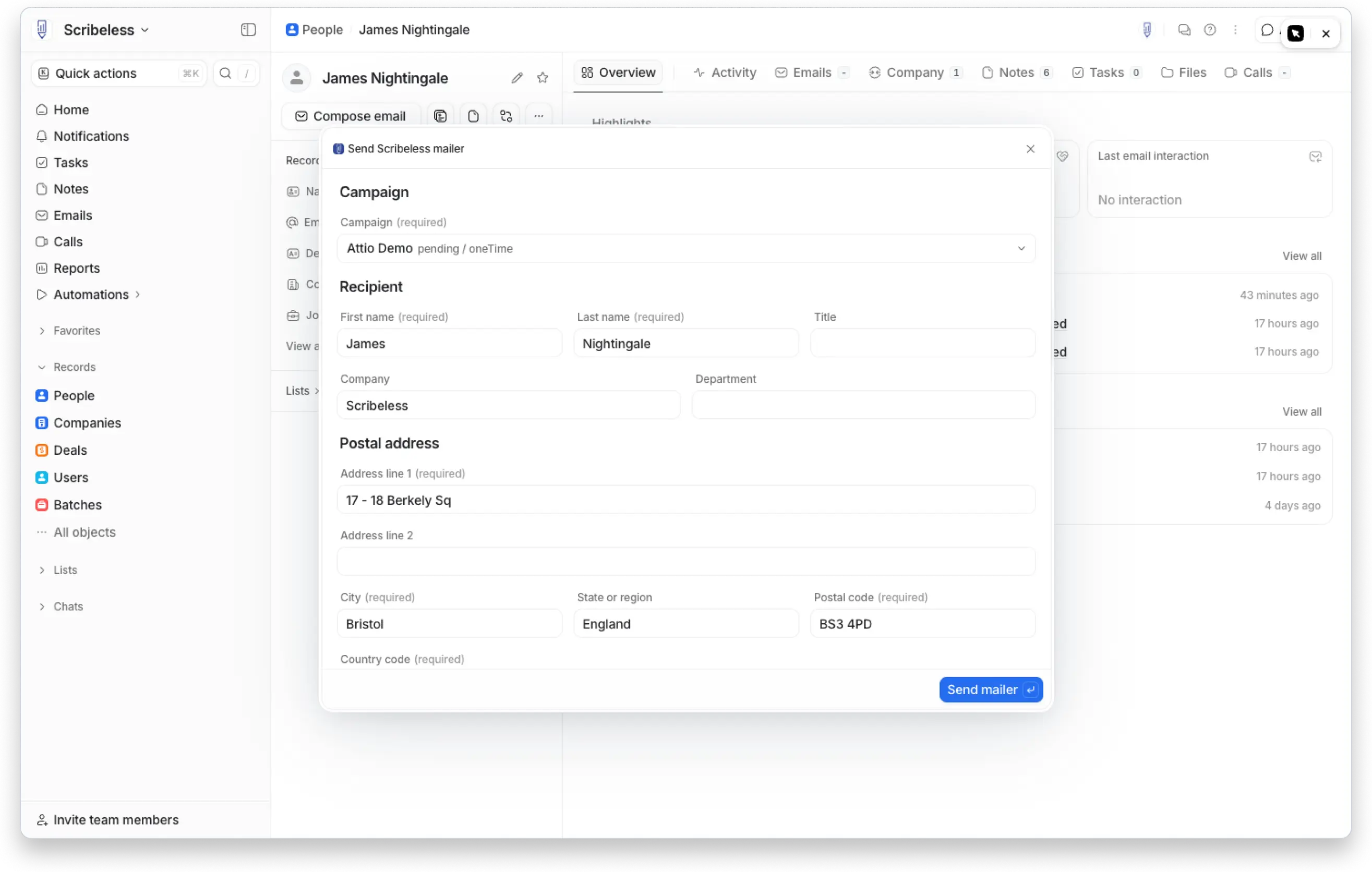
With the native Scribeless Attio integration, a user can open a person record, choose Send Scribeless mailer, select an existing Scribeless campaign, review the recipient fields, fill the campaign variables, and create the recipient in Scribeless.
This guide covers the decisions that matter before the first rollout:
- which Attio moments are worth a physical mailer
- what the sender should check before sending
- which fields admins should map once
- which values should become Scribeless template variables
- how to use QR scans and follow-up tasks without treating every scan as revenue
If you need the broader CRM model first, start with the CRM-triggered direct mail guide. This post is Attio-specific: sending from individual person records for sales, founder-led growth, partnerships, and customer teams.
Quick-start Attio recipes
Use these as first builds before widening the program.
| Use case | Attio starting point | Scribeless campaign | Sender-owned field | Follow-up |
|---|---|---|---|---|
| Post-meeting thank-you | Person record after a meaningful sales call, founder call, or customer conversation | Owner thank-you note | specific_detail | Task after expected delivery |
| Strategic account reactivation | Target person at a quiet account, open deal, or high-fit company | Re-engagement card | useful_reason_to_reach_out | Owner call or email task |
| Warm intro follow-up | Person created from a referral, partner intro, investor intro, or event conversation | Personal intro note | intro_context | Follow up with the referrer copied only where appropriate |
| Customer milestone note | Customer contact tied to onboarding, launch, renewal, or expansion | CSM or founder milestone note | milestone_context | CSM task before next meeting |
| Event or roundtable follow-up | Person added to an event list with notes from the conversation | Event follow-up note | conversation_topic | SDR, AE, or host follow-up |
The shared rule is simple: do not send mail just because Attio has an address. Send it when the owner can name the reason the recipient should receive a handwritten note.
How the Attio send path works
The native Attio app is best for reviewed person-record sends. A teammate opens the record, checks the address and context, then creates the Scribeless recipient.
That review step is the point. If the address is incomplete, the campaign is wrong, or the message could apply to any company, the sender can fix it before the physical mailer is created.
The user flow:
- Open the person record in Attio.
- Run the Send Scribeless mailer action.
- Choose a Scribeless campaign from the dropdown.
- Review the person, company, and postal address fields.
- Fill any campaign-specific variables the template needs.
- Send the mailer into the selected Scribeless campaign.
- Use the delivery window, QR scan, or campaign status to prompt follow-up.
What should be reviewed by the sender
Sender review matters most for fields that affect what the recipient will see.
| Field | Review rule |
|---|---|
| Recipient name | Make sure the first name works in a greeting |
| Company | Include it only if the note or reporting needs it |
| Postal address | Block or fix incomplete address fields before sending |
| Campaign | Choose the specific use case, not a generic catch-all campaign |
| Custom message | Keep it short, specific, and tied to the actual relationship |
| QR destination | Confirm it points to the right booking page, proposal, event page, or resource |
If the sender cannot explain why the person is receiving the note, the mailer should not be sent yet.
Automation while the connector is in progress
Coming soon: a Scribeless Attio workflow connector for automations.
In the meantime, use Attio's HTTP request module to send data to Scribeless from Attio workflows. The Scribeless API docs cover the request shape and authentication details.
Use the HTTP-request path when the eligibility rules are clear and the required data is already clean. It is a bad fit for campaigns that need a rep to write a fresh sentence for each person.
| Workflow step | Purpose | Check before launch |
|---|---|---|
| Trigger and filters | Decide which records qualify | Include do-not-mail and frequency-cap rules before the request |
| Field validation | Confirm required recipient fields exist | Block missing first name, address line, city, postal code, and country |
| HTTP request to Scribeless | Create the recipient or add the person to a campaign | Send only the fields the template or reporting actually uses |
| Error handling | Decide what happens if the request fails | Log the failure in Attio and create an owner or ops task instead of silently dropping the send |
| Attio writeback step | Keep follow-up visible for the owner | Add this as a separate Attio workflow step; do not assume the HTTP request updates the record by itself |
For API-driven sends, store the Scribeless recipient or campaign reference on the Attio record where possible. That gives you a simple dedupe check before the workflow sends again.
Keep authentication out of editable message fields. Store API credentials in the workflow's secure configuration, rotate them if access changes, and do a test run with one internal record before enabling the trigger for a live list.
Use the manual person-record action when judgment matters. Use the HTTP-request workflow when the message and eligibility rules are already controlled. Move repeatable sends to the native workflow connector when it is available.
Campaigns worth building in Attio
Choose the first campaign by looking at where Attio has both reliable data and useful context. Sales teams usually start with post-meeting thank-yous. Founder-led or partnerships teams often get more value from warm-intro notes. Customer teams should start with milestones because the recipient already recognizes the moment.
Post-meeting thank-you
Use this after a real conversation, not after every calendar event. The note should reference one point from the call and reinforce the next step.
Check these fields before sending:
- recent note or call summary
- deal stage or relationship stage
- company fit
- owner
- next task
- last mailed date
Useful template variables:
| Variable | Example |
|---|---|
specific_detail | "your point about making partner follow-up feel less automated" |
next_step | "the workflow example we discussed" |
sender_name | "Maya" |
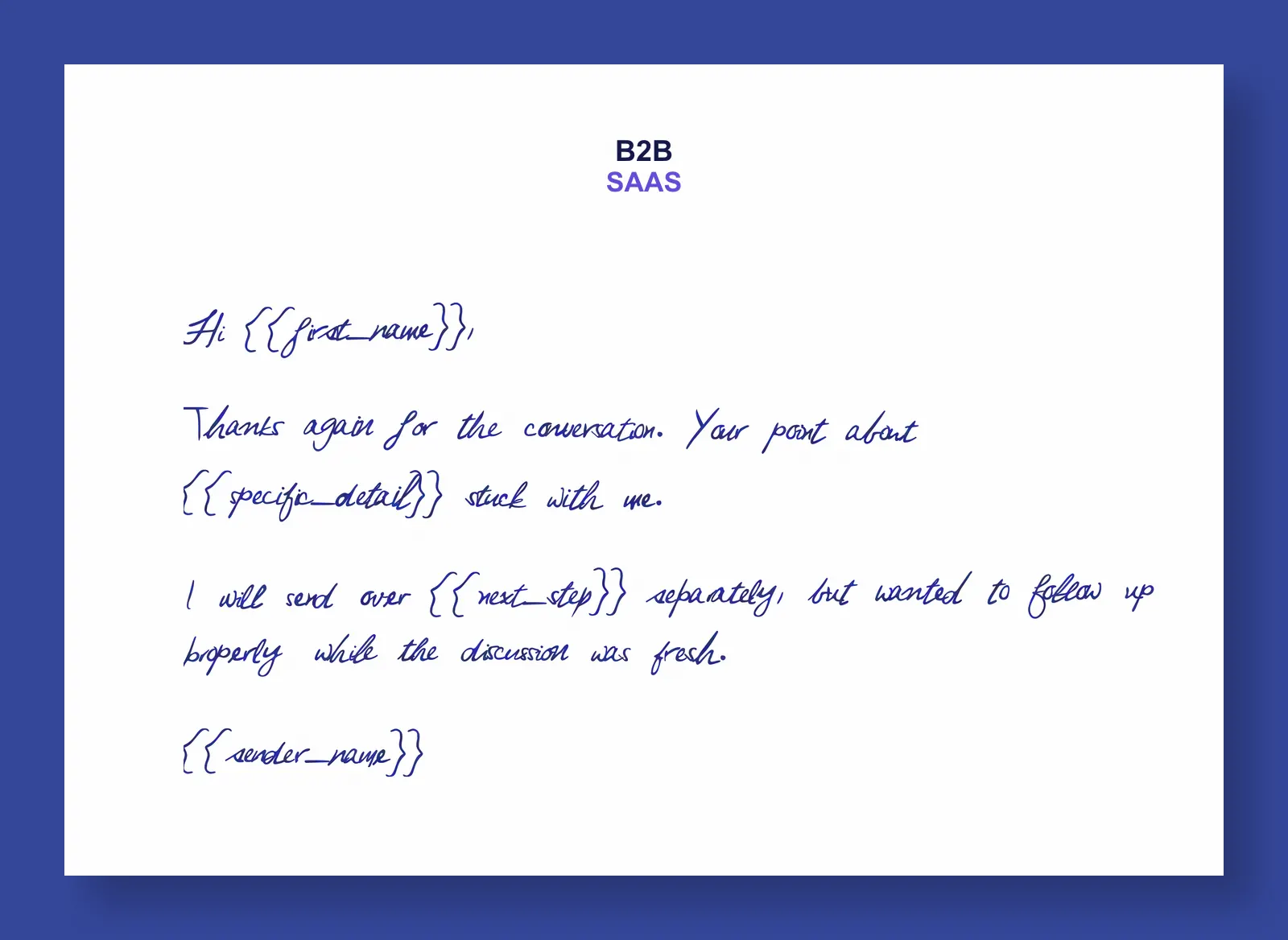
Hi ,
Thanks again for the conversation. Your point about stuck with me.
I will send over separately, but wanted to follow up properly while the discussion was fresh.
The personalized line should identify the exact moment from the call. Do not use the note to recap the whole meeting.
For more sales-sequence ideas, use the B2B sales outreach direct mail guide.
Strategic account reactivation
Reactivation only works when the owner has a current reason to reopen the conversation.
Good candidates include quiet accounts with a known blocker, target companies with a new hiring signal, or previous conversations that became relevant again. Weak candidates are records where the only reason is "we have not heard back."
The sender should choose the reason before sending. It could come from an Attio note, a company change, a deal blocker, a hiring signal, or a previous conversation.
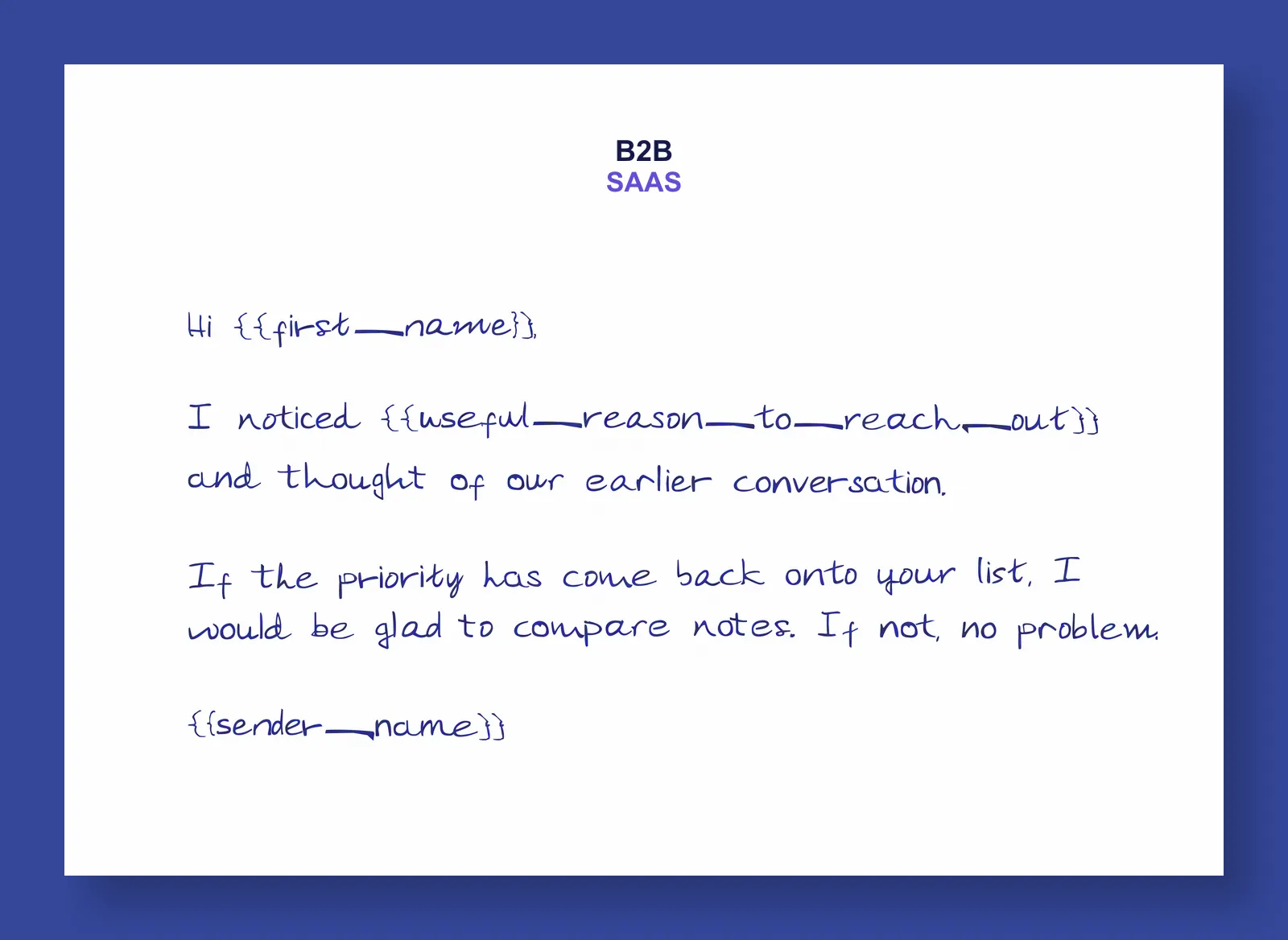
Hi ,
I noticed and thought of our earlier conversation.
If the priority has come back onto your list, I would be glad to compare notes. If not, no problem.
Tie the send to an accountable next step. Create an owner task for after the expected delivery window, then measure whether the mailed cohort produced meetings, replies, stage movement, or renewed conversations.
Warm intro follow-up
Warm intros need a different tone from cold outbound.
If a partner, founder, investor, customer, or advisor introduces you to someone, the first follow-up should respect that context. The note should acknowledge the intro, then make the next step easy.
Send when the relationship context is real:
- a high-value referral joins Attio as a new person
- a founder receives an intro from an investor or customer
- a partner hands over a prospect after a joint event
- a strategic contact accepts a first meeting
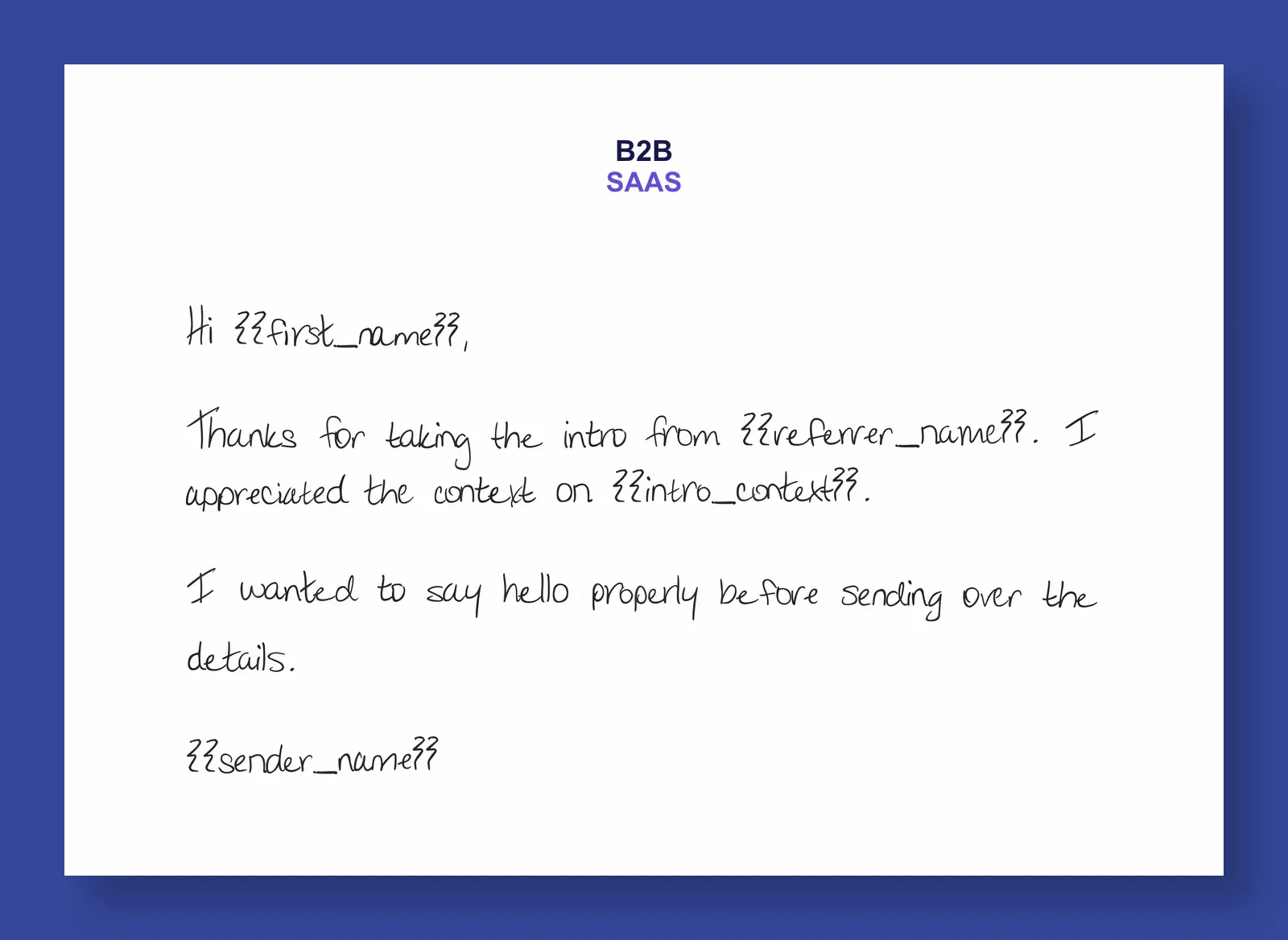
Hi ,
Thanks for taking the intro from . I appreciated the context on .
I wanted to say hello properly before sending over the details.
Be careful with the referrer field. Only name the referrer if the recipient would recognize the context and the referrer would be comfortable being included.
Customer milestone note
Customer mail should not read like sales mail. Use it to thank the person for a visible milestone and set up the next CSM or founder conversation.
The best triggers are moments the customer would recognize:
- onboarding completed
- first campaign shipped
- first measurable result achieved
- renewal planning begins
- champion helped move a project forward
- expansion conversation starts
Useful variables:
| Variable | Example |
|---|---|
milestone_context | "your team shipped the first handwritten renewal campaign" |
customer_goal | "making high-value follow-up feel less automated" |
csm_name | "Jordan" |
next_meeting_context | "the planning session next week" |
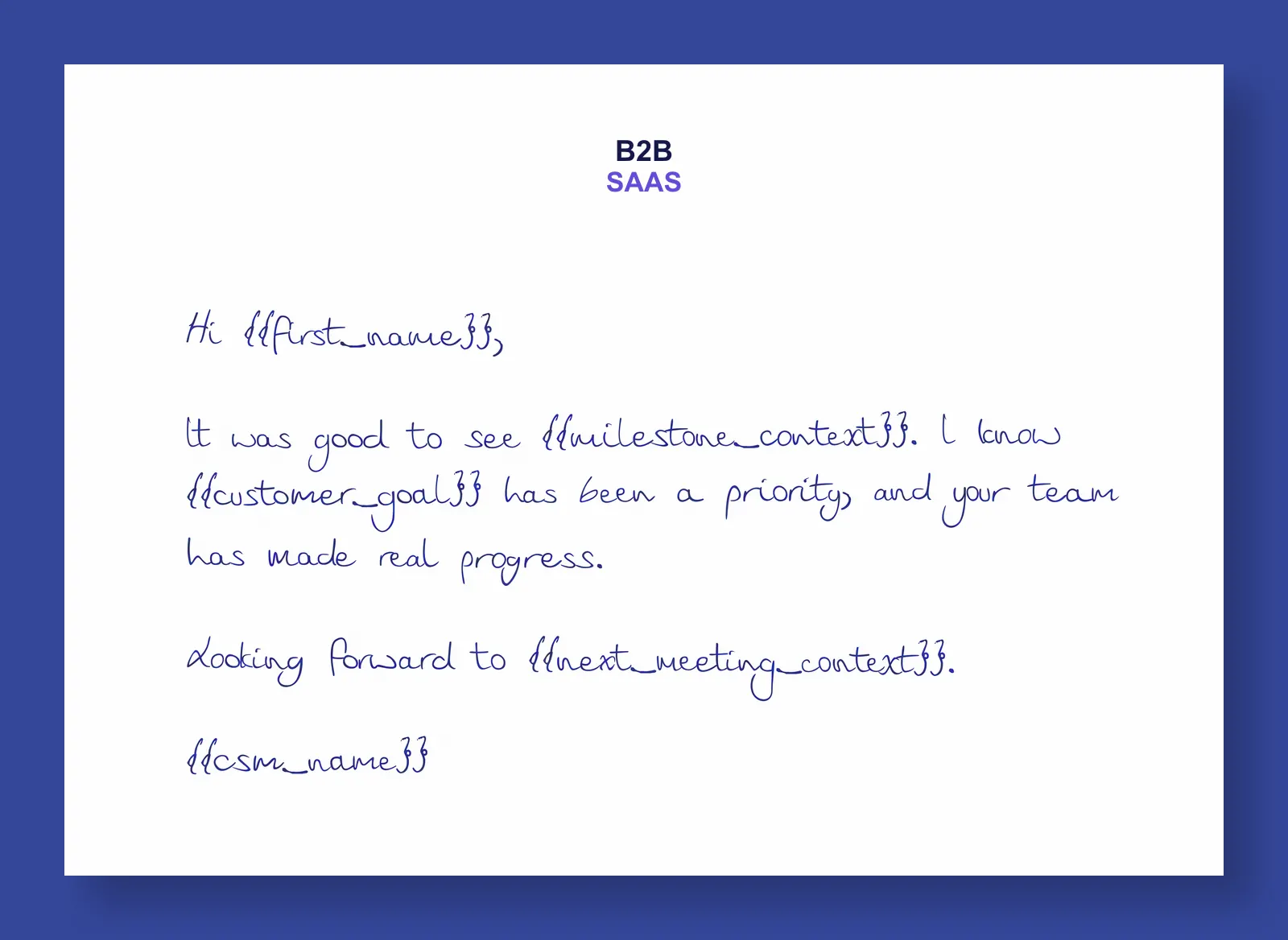
Hi ,
It was good to see . I know has been a priority, and your team has made real progress.
Looking forward to .
For customer programs, pair this with the B2B retention direct mail playbook.
Event or roundtable follow-up
Event follow-up is easy to overdo. The useful version is specific to a conversation, dinner, roundtable, booth visit, or session topic.
Use an Attio list or saved view to collect the people worth mailing, then send from each person record after checking the note field.
Good inputs:
- event name
- conversation topic
- session attended
- host or owner
- promised resource
- next step
Avoid inputs like "met at event", "great conversation", or "following up from the conference". They do not give the recipient a memory cue.
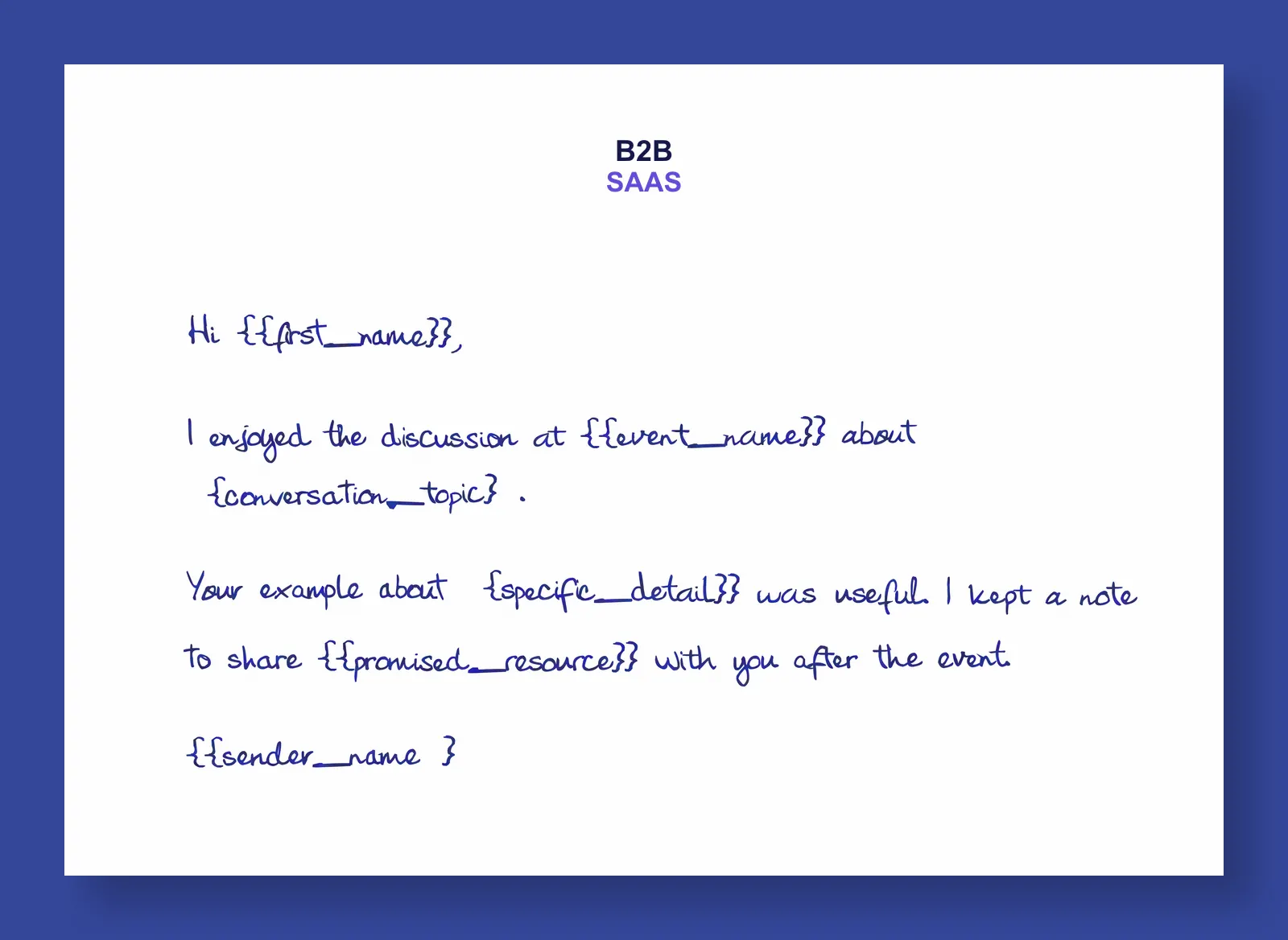
Hi ,
I enjoyed the discussion at about .
Your example about was useful. I kept a note to share with you after the event.
That is enough context to remind the recipient which conversation you mean without turning the note into a long recap.
Admin setup and field mapping
Admins should map stable fields once so senders can focus on the parts that need judgment.
The Attio settings screen controls default field mapping, campaign variable defaults, and analytics values that can be sent with the Scribeless recipient for reporting and downstream matching.
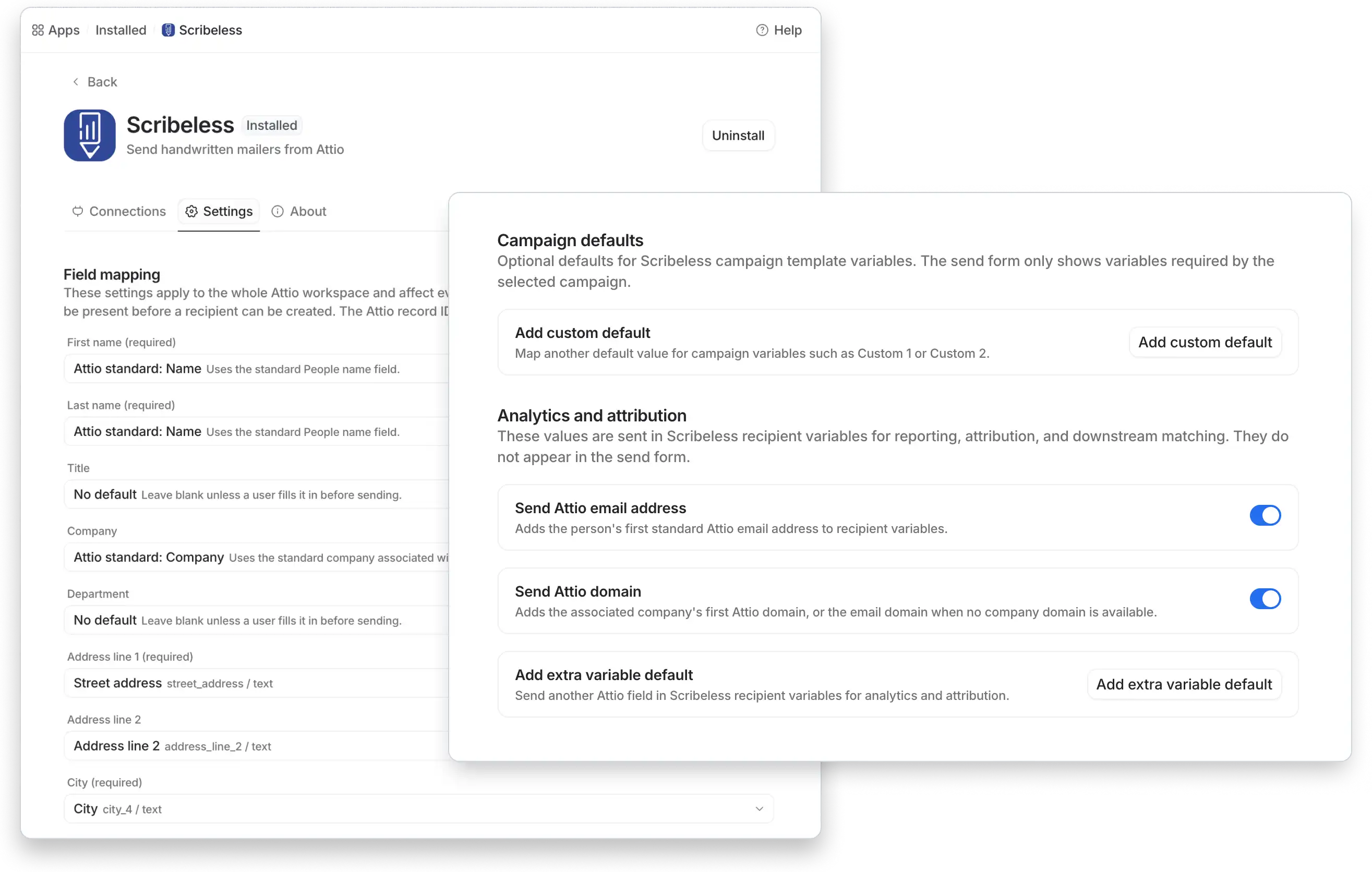
Start with delivery fields:
| Scribeless field | Attio source |
|---|---|
| First name | Attio standard People name field |
| Last name | Attio standard People name field |
| Company | Associated company or a workspace-specific company field |
| Address line 1 | Street address attribute |
| Address line 2 | Address line 2 attribute |
| City | City attribute |
| State or region | Region, state, or county attribute |
| Postal code | Postal code attribute |
| Country code | ISO country code or governed country field |
Then decide what should prefill campaign variables.
Use campaign defaults for values that are safe and consistent:
- sender name
- owner booking link
- default QR destination
- campaign category
- source workspace or list name
Do not default the human sentence unless the team has a review process. A weak default message is worse than no message because it makes a physical note feel automated.
What belongs in template variables
Keep the payload small. Only send fields that affect the mailer, QR destination, or reporting you actually use.
| Layer | Examples | Who owns it |
|---|---|---|
| Recipient fields | name, company, postal address | Admin and data owner |
| Campaign variables | sender name, QR destination, event name, meeting detail | Campaign owner and sender |
| Attribution values | Attio email, Attio domain, source record, campaign ID | Ops |
| Follow-up fields | task owner, delivery window, QR scan timestamp | Ops and owner |
Useful Attio-to-Scribeless variables include sender_name, specific_detail, qr_destination, source_system, source_person_email, and source_company_domain.
The practical rule: if the recipient can see it, a human should review it. If it is only for reporting, keep it structured and internal.
Avoid sending internal notes, sensitive deal details, or anything that would feel strange if the card were shown to someone else at the company.
What happens in Scribeless after the send
After the user creates the recipient from Attio, Scribeless holds the campaign, recipient, address, status, template, and preview.
Attio remains the relationship workspace. Scribeless handles the physical mailer: production setup, rendering, checks, and shipping.
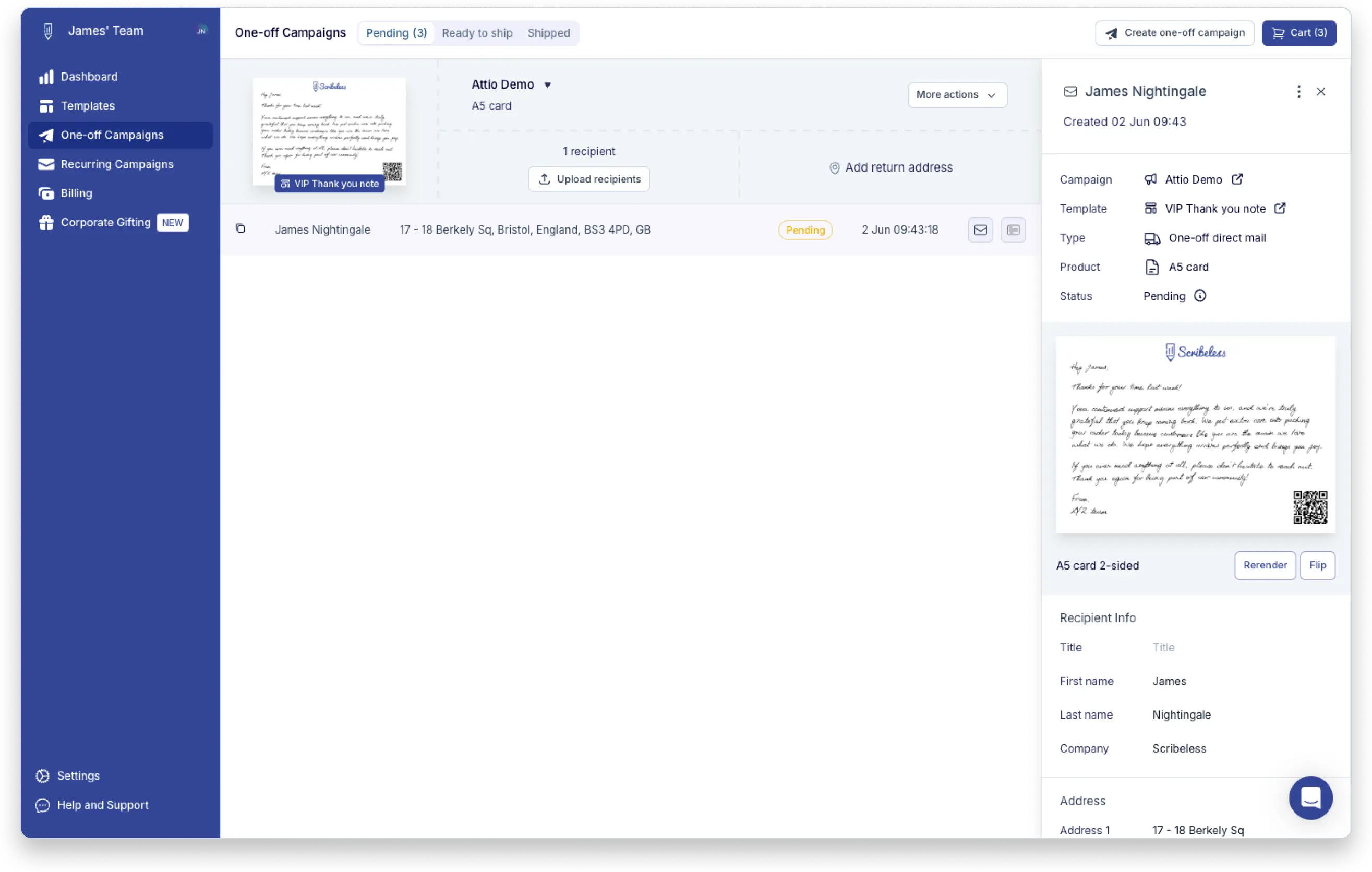
Before production, check:
- recipient appears in the correct campaign
- name and postal address are correct
- product and template are correct
- preview renders cleanly
- status matches the expected campaign state
- any QR code resolves to the intended destination
If the mailer uses a custom message field, preview it like a recipient would read it. The question is not "did the field render?" The question is "does this sound like it came from the sender?"
QR tracking and Attio follow-up
QR scans are useful, but they are not the same thing as revenue.
Use QR codes to create a follow-up signal. A recipient might scan a booking link, proposal page, event recap, onboarding resource, or renewal plan, then leave without taking the next action. That is still useful because it tells the owner where to follow up next.
Minimum tracking model:
| Signal | Where to use it | Follow-up |
|---|---|---|
| Mailer created | Scribeless campaign and recipient | Confirm the send exists |
| Mail campaign ID | Scribeless and reporting | Match mailed contacts to outcomes |
| QR scan | Redirect analytics, Scribeless reporting, or downstream workflow | Create an owner follow-up task |
| Meeting booked | Calendar or CRM reporting | Measure conversion separately from scan |
| Deal or customer movement | Attio deal, company, or relationship reporting | Compare mailed cohort against similar unmailed records |
If your workflow pushes scan engagement back into Attio or another system, keep the update simple: last scan time, campaign ID, source recipient, and owner task. Do not trigger another mailer just because someone scanned.
For the implementation layer behind QR redirects, UTMs, CRM logging, and matchbacks, use the direct mail tracking stack guide.
What to build first
Start with one sales motion and one relationship motion.
Recommended first pair:
- Post-meeting thank-you from a person record.
- Customer or warm-intro milestone note from a person record.
That gives the team two different modes: a sales follow-up after a real conversation, and a relationship note that recognizes context the recipient would understand.
Keep the first rollout narrow:
- one or two campaigns
- one sender group
- one custom message field
- clear address checks
- one follow-up rule
- simple reporting on sent mail, QR scans, meetings, and record movement
Keep one message review rule: if the note could have been sent to any person at any company, it is not specific enough for a handwritten mailer.
Once those work, add strategic account reactivation, event follow-up, and customer milestone campaigns.
The quality bar is simple: every Attio send should have a named owner, a specific reason, a usable address, a reviewed message field, and a follow-up path after delivery.
Want to design an Attio direct mail motion around founder follow-up, strategic accounts, events, or customer milestones? Talk to Scribeless.