All integrations

Google Analytics integration

Send Smart QR scan events from direct mail into Google Analytics 4

Connect Scribeless Smart QR scans to GA4 so direct mail engagement appears beside your website analytics, campaign reporting, and attribution workflows.

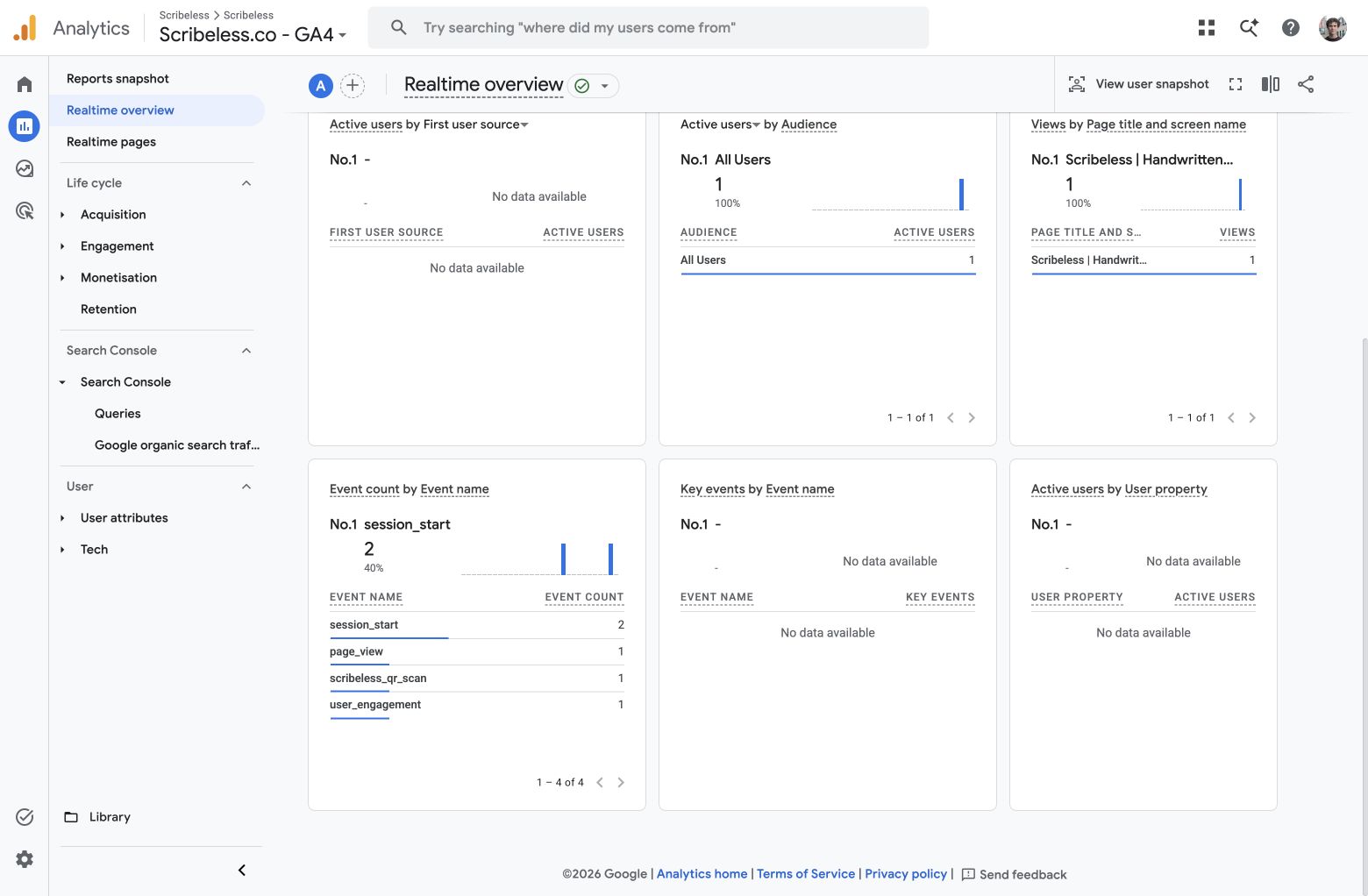
Google Analytics Realtime overview showing the scribeless_qr_scan event from a Smart QR scan

Ways to send

Track the landing session and the scan event.

Use UTM parameters to attribute the website visit, then send a server-side QR scan event to GA4 so scan engagement is visible even when the landing page is not the whole story.

Campaign attribution

UTM-tagged QR destinations

Point each Smart QR code at a destination URL with campaign-specific UTM parameters.

  • Use utm_source=scribeless and utm_medium=direct_mail
  • Set utm_campaign to the campaign or offer
  • Let your existing GA tag measure the landing page session
  • Keep QR destinations mobile-friendly and easy to test
Scan event

Server-side GA4 event

Forward Scribeless QR scan webhooks to GA4 as a Measurement Protocol event named scribeless_qr_scan.

  • Verify the Scribeless webhook signature
  • Deduplicate by Scribeless scan event ID
  • Send campaign, QR block, and destination context
  • Avoid sending personal data into GA4

How it works

How Scribeless QR scans reach GA4.

Use a secure receiver between Scribeless and GA4 to translate direct mail engagement into analytics events.

GA4 setup

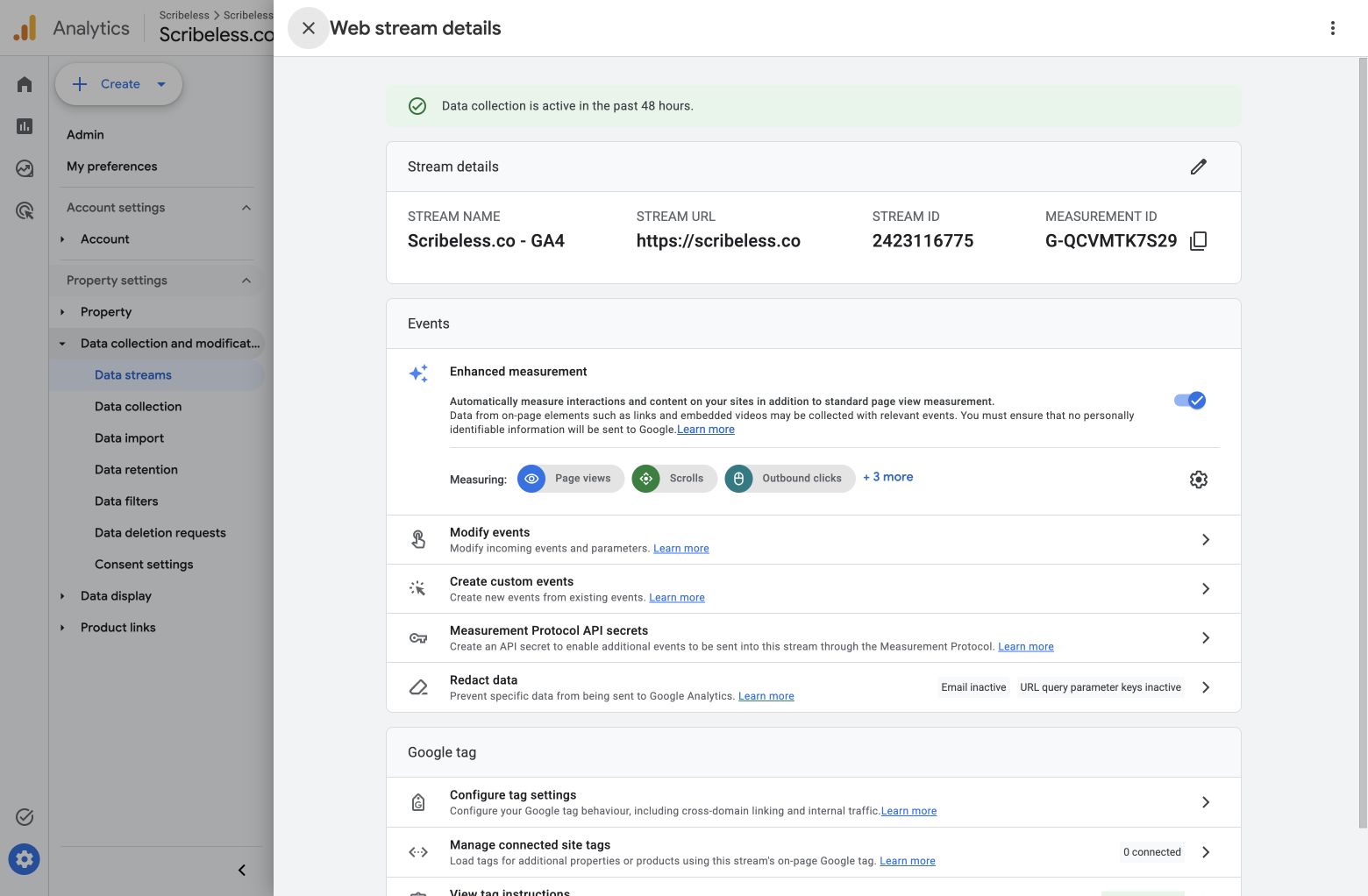
Use the web stream Measurement ID and API secret

Create a Measurement Protocol API secret for the relevant GA4 web stream, then keep the secret server-side in the receiver.

  • Copy the Measurement ID from the GA4 web stream
  • Create a Measurement Protocol API secret
  • Store the API secret outside browser code and public repos
Google Analytics web stream settings showing the Measurement ID and Measurement Protocol API secrets option

Realtime verification

Confirm the scribeless_qr_scan event in GA4

After a QR scan, open GA4 Realtime and verify that the event table includes scribeless_qr_scan.

  • Scan the Smart QR code or open the short URL
  • Check Reports > Realtime overview
  • Register key event parameters as custom dimensions
GA4 Realtime event table showing scribeless_qr_scan after a Smart QR scan

Reporting plays

Use GA4 when direct mail should sit inside the same reporting view as digital campaigns.

Start with aggregate scan reporting, then add deeper attribution once your landing page flow can pass the right identifiers.

01

Campaign scan reporting

Send campaign ID, QR block ID, destination host, and scan medium into GA4 so campaign owners can compare direct mail scan volume by offer.

02

Agency client proof

Show local campaign engagement in GA4 alongside landing page sessions, conversions, and source/medium reporting.

03

Home services follow-up

Track which HVAC, roofing, plumbing, or moving campaigns generate scan intent, then use scan context to prioritize follow-up outside GA4.

Tracking loop

Keep direct mail measurable without sending personal data to GA4.

The webhook receiver maps each Smart QR scan to a GA4 event with operational context, while personal recipient details stay out of Analytics.

  1. Add a Smart QR code to the Scribeless template.
  2. Use a UTM-tagged destination URL for the landing page session.
  3. Forward qr_code.scanned webhooks to a secure GA4 receiver.
  4. Send a GA4 Measurement Protocol event named scribeless_qr_scan.
  5. Register reportable parameters such as campaign_id, qr_block_id, destination_host, and scan_medium.

Launch checklist

  • GA4 property and web stream are confirmed
  • Measurement Protocol API secret is stored server-side
  • Webhook signature verification is enabled
  • Webhook receiver deduplicates scan events
  • No names, emails, postal addresses, or other PII are sent to GA4
  • QR destination URL includes UTM parameters
  • Realtime event has been verified before launch
  • Custom dimensions are registered for reporting

Next step

Bring Scribeless QR scan data into your GA4 reporting.

We can help configure the receiver, choose the event parameters, and test the scan-to-GA4 path before a campaign goes live.